Managing your plan and billing
Compare Free, Connect and Pro, upgrade or downgrade with prorated pricing, and track your usage against the limits.
Good fit if you have hit a plan limit or want the watermark gone, and need to know which tier actually fits before you pay.
Vindaris has three tiers, Free, Connect and Pro, that gate scale (integrations, AI summaries, seats) and a couple of premium touches, not the core product. Every plan, including Free, gets the full strategy-execution feature set.
What each tier includes
Plans are priced per user, billed monthly or annually (an annual plan pays for ten months, so two are free). Your organization runs on the owner's tier.
- Free.Up to 5 members, 2 integrations and 5 AI summaries a month. Synced and outbound tasks carry a small Vindaris watermark, which lifts for good once your workspace reaches 5 members.
- Connect, 10 euro per user each month.Up to 10 members, unlimited integrations, unlimited AI summaries and alignment suggestions, and scheduled email reports. Adding an eleventh member moves the whole organization to Pro.
- Pro, 20 euro per user each month.Unlimited members, no watermark ever, the "Do it for me" agentic help assistant, human-led onboarding, and direct email support with a 24-hour response.
Change your plan
Billing is an admin area.
- Open Admin → Billing.The header shows your current plan and renewal status, the three tier cards compare what each includes, and a usage panel counts the integrations and AI summaries you have used against your limits.
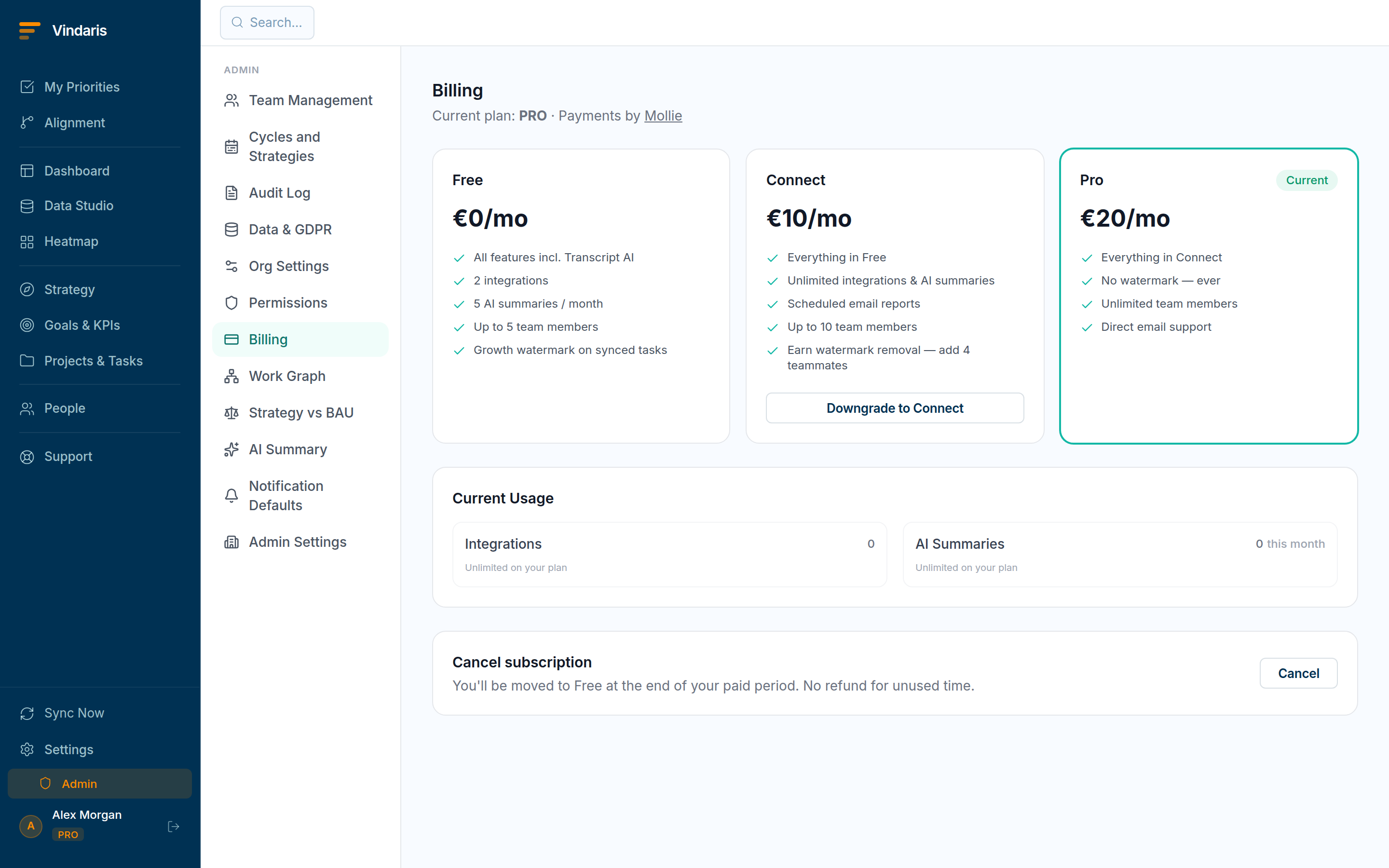
Admin → Billing: tiers, usage and upgrade or downgrade. - Pick a tier and enter your card.Card details are entered in an integrated checkout powered by Mollie, so you stay inside Vindaris. An upgrade charges the prorated remainder now and the new rate next period; a downgrade converts your unused balance to credit with no charge today.
- Cancel from the "Cancel subscription" section if you need to.You keep your current tier until the period ends, then move to Free. There is no refund for unused time and no immediate loss of access. A failed renewal gets a 7-day grace period before the plan steps down.
The growth watermark on synced tasks is there to spread the product, not to punish Free users, so reaching 5 members removes it for good with no upgrade required (Admin → Billing shows the progress). Growth and revenue are decoupled on purpose: you can earn the clean experience by bringing your team, or buy scale (more integrations, seats and AI) by upgrading. They are different needs.
You can also pick Connect or Pro during signup. The account is created on Free first, then the same Mollie checkout collects payment and flips the plan, so you land in the app already on the tier you chose.
When teams reach for this
Plans are Free, Connect and Pro, priced per user and billed monthly or annually. Billing lives in an admin area, where you compare the tiers, change plan with prorated pricing, and track usage against the limits that triggered the prompt.
Who it helps
Vindaris fits the workspace admin or operations lead who owns billing, and the founder or COO watching what the team spends. It suits scale-ups and mid-market companies, roughly 30 to 500 people, where seats and integrations grow team by team and someone has to keep the plan matched to real use.
Why it helps
At that size usage creeps as more teams come on, so a plan that fit last quarter starts bumping limits this one. Vindaris prices per user and shows usage against each limit, so the admin can right-size the plan and upgrades or downgrades prorate instead of becoming a guess.
In practice
- Right-size the plan to real usage. The billing area tracks your usage against each tier's limits, so you can see which limit you are actually hitting before you upgrade. Changes prorate, so moving up mid-cycle costs only the remainder of the period.ExampleAn ops lead sees the team is one seat over on Connect and nowhere near the integration limit, so they add a single seat rather than moving the whole workspace to Pro.
- Start on a paid plan at signup. You can begin on Connect or Pro at signup rather than upgrading later, so a team that already knows it needs the paid features skips the free step. The watermark is removable without paying, so an unpaid workspace still looks clean in a screenshot.ExampleA 60-person company that needs several integrations from day one starts on Pro at signup, so the rollout begins with the limits it needs.
- Keep billing with the right people. Billing is an admin area, so plan changes and payment sit with the admins who own the workspace rather than with every member. Members meet a prompt when they reach a limit, and the admin acts on it.ExampleA PM reaches the AI summary limit mid-quarter, and the request routes to the workspace admin, who upgrades without the PM needing billing access.
Vindaris maps your strategy, goals and KPIs down to every project and task, and the Work Graph flags execution risk wherever effort has drifted from the goal, with task-level context down to the Slack thread.
Put this into practice
Vindaris keeps strategy, goals, projects and tasks in one place, and the Work Graph flags execution risk before it costs you. Start free, no credit card.
Sign Up for Free