Strategic planning that stays live after the offsite ends.
Most plans are written in two days and drift from the work over the next ten months. Vindaris links each part of the plan to the goals and tasks delivering it, so the plan keeps reporting on itself.





What is strategic planning software?
Strategic planning software helps you build the plan: the objectives, the initiatives, the owners, the numbers and the timeline. The good products make that process faster and the output clearer. The question worth asking during evaluation is what the tool does in the nine months after the plan is signed off.
How is it different from strategy execution software?
Planning software is optimised for the weeks around the offsite, when the plan is being built. Execution software is optimised for the quarters after, when the plan and the work drift apart. Many teams need both, and the handover between them is where plans usually go quiet. See strategy execution management.
Does a strategic plan need Gantt charts?
Rarely, at the strategy level. A Gantt chart is a delivery artefact and strategic initiatives are usually too coarse for one to be meaningful. What the plan does need is the ability to open an initiative and see the actual projects and tasks under it, which is a different capability.
How do you keep a plan current?
Not by scheduling reviews to update it, which is the standard answer and the reason plans go stale between reviews. A plan stays current when its initiatives are connected to the work delivering them, so progress and risk change as the work changes rather than as the calendar turns.
What should trigger a plan revision?
Evidence that an assumption behind it has changed, which usually shows up in the work long before it shows up in a number. An initiative nobody has touched for six weeks is a signal about priority, and it is visible immediately when the plan can see the work under it.
 Click thru live demo
Pre-built workspace. No signup.
Click thru live demo
Pre-built workspace. No signup.
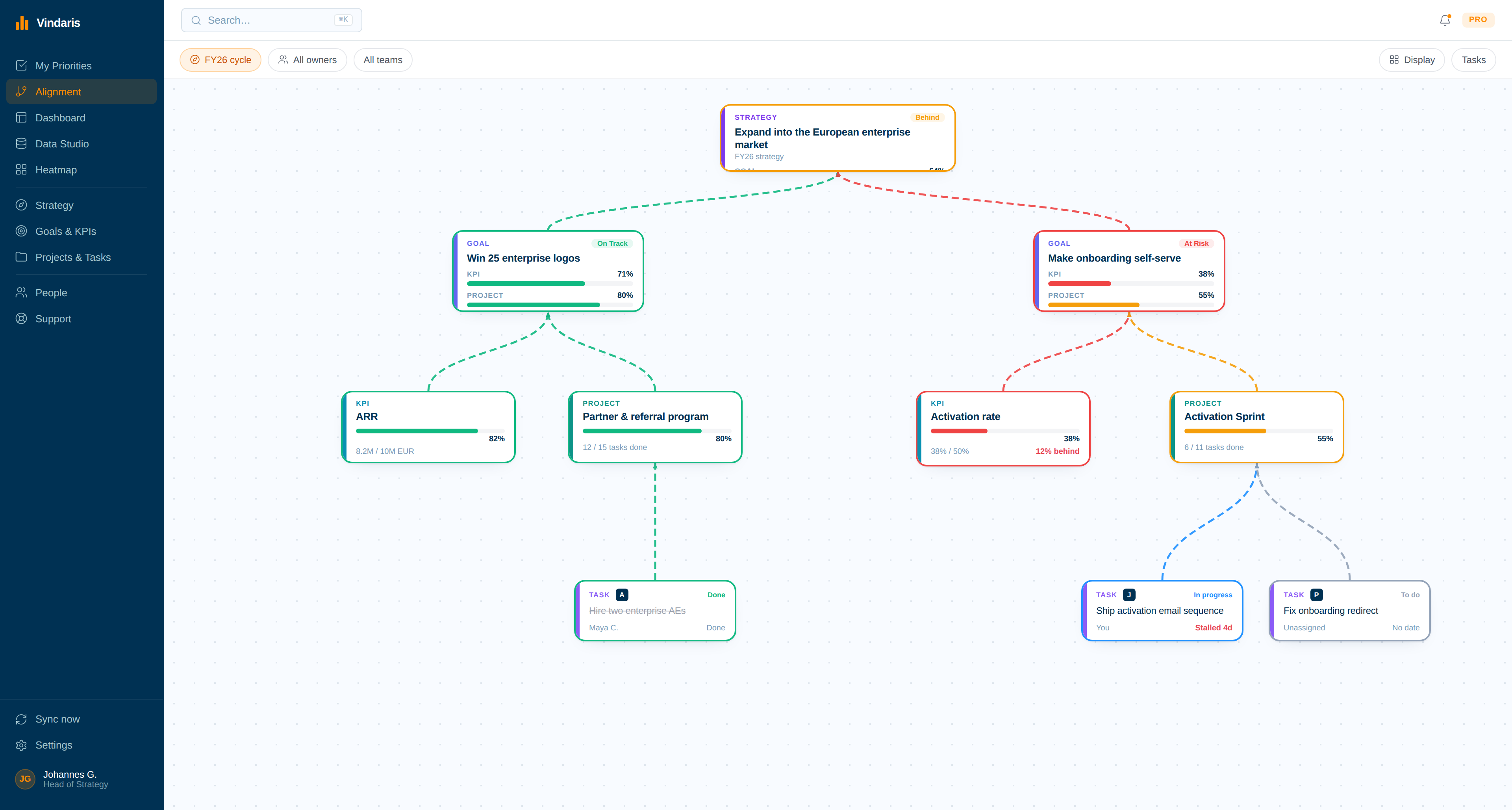
The plan as a live board: strategic bets at the top, the goals and KPIs beneath them, and the projects and synced tasks delivering each one. Click through the live workspace, no signup.
For the week before the offsite.
Planning tools are busiest in the fortnight around the offsite. The plan is decided in that fortnight and lost in the three quarters afterwards.
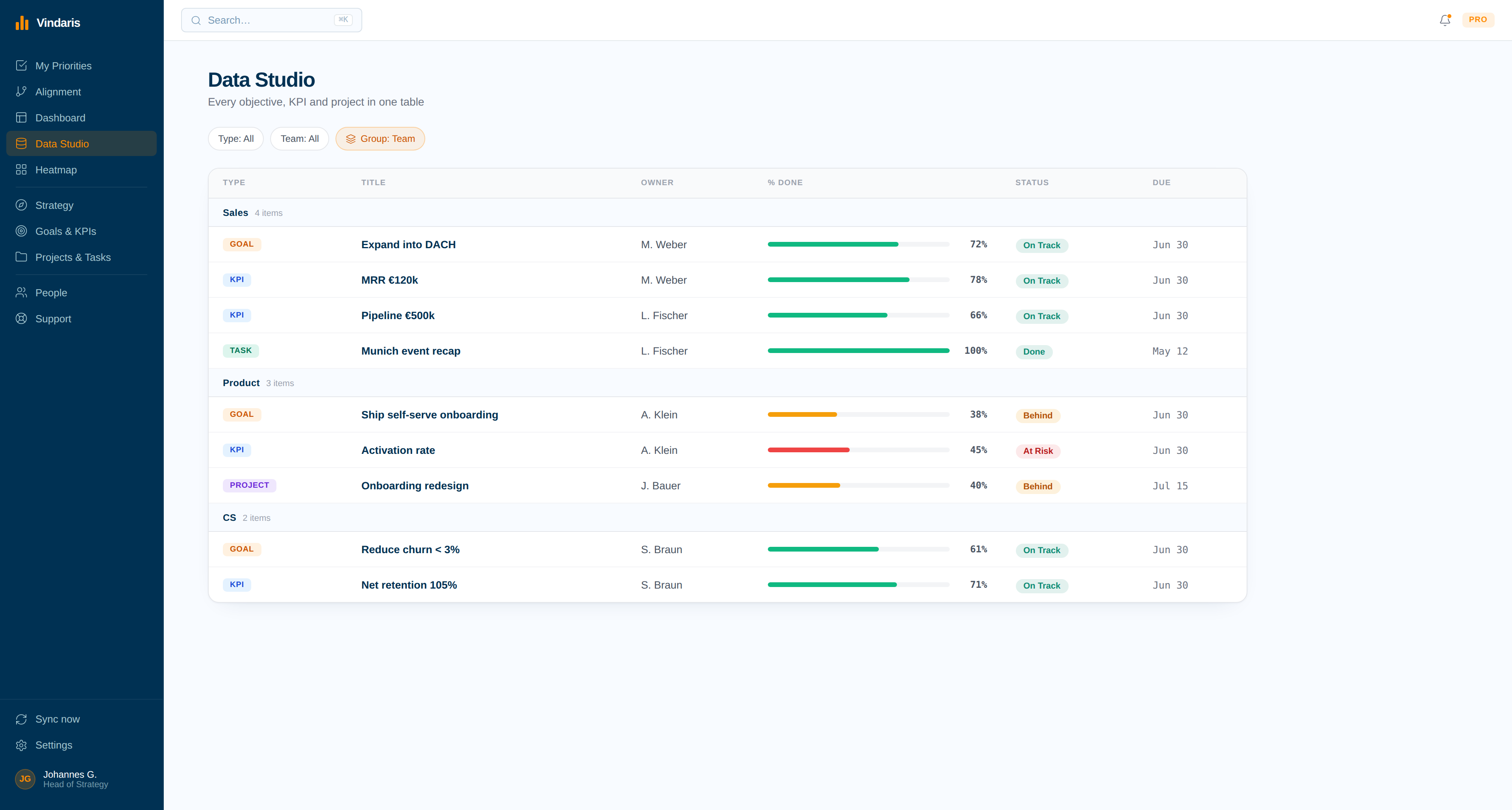
A plan that is still true in month seven.
Planning tools are built for the fortnight around the offsite. The hard part is the three quarters afterwards, when the plan and the work drift apart and nothing in the document notices.
One copy, not a copy of a copy
The plan is a view over the work rather than a parallel record of it, so there is nothing to reconcile and no way for the board version and the delivery version to tell different stories.
Ambition checked against bandwidth
Most plans fail on arithmetic nobody did: more initiatives than people to run them. Vindaris tracks the finite capacity behind each initiative, so over-commitment is visible at planning time rather than in month five.
Drift is a signal, not a discovery
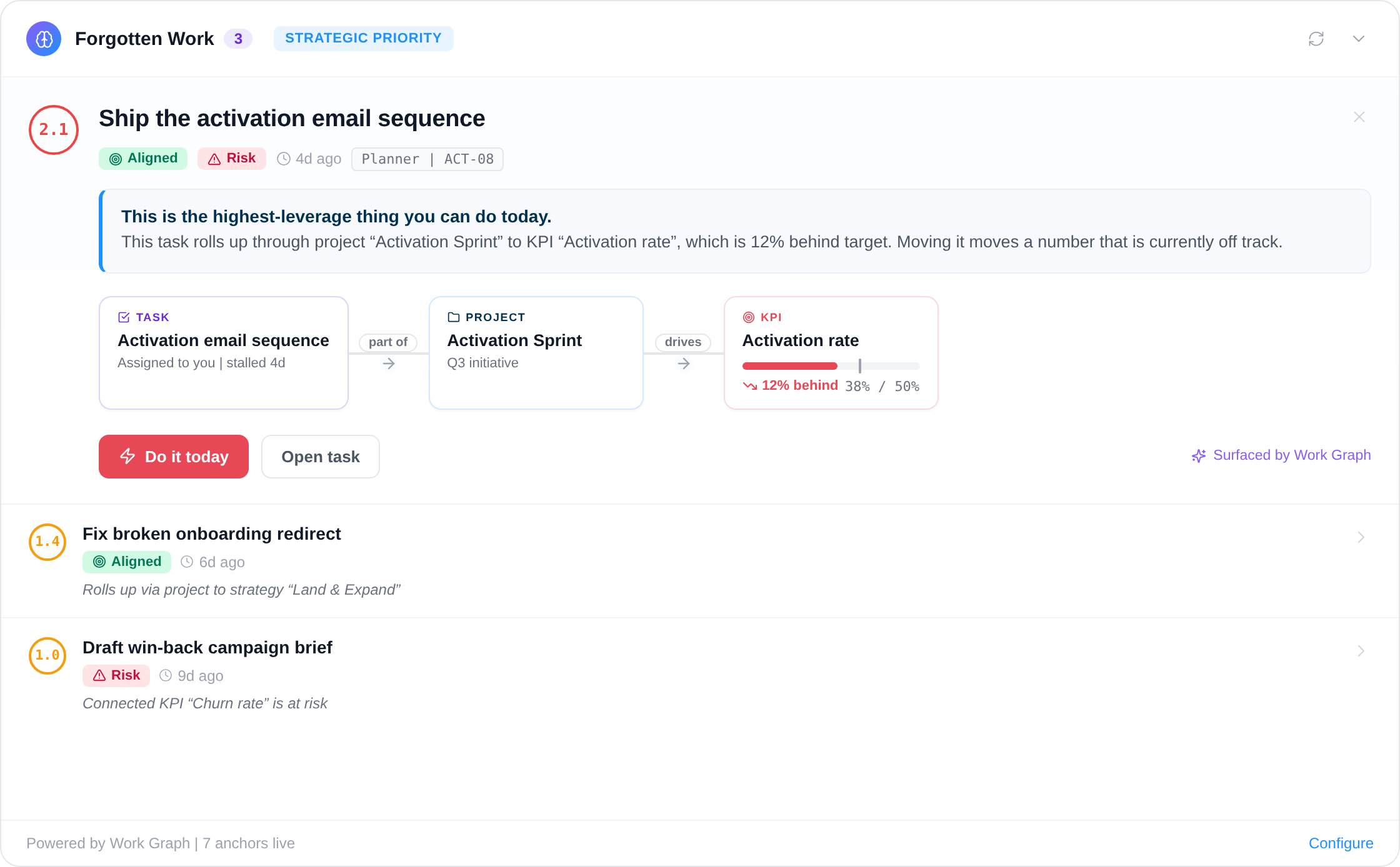
An initiative nobody has touched for six weeks says something about priority long before its status field does. The Work Graph reads pace and focus against the plan and flags where reality has quietly moved on.
Capture the strategic plan
Build the plan on a canvas: objectives, the initiatives chosen to deliver them, the owners and the measures. Draft it from a paragraph of plain language and adjust the structure rather than a document.
- One initiative can serve two objectives without being duplicated.
- Rename every level to match the language the plan already uses.
Write the board pack from the graph
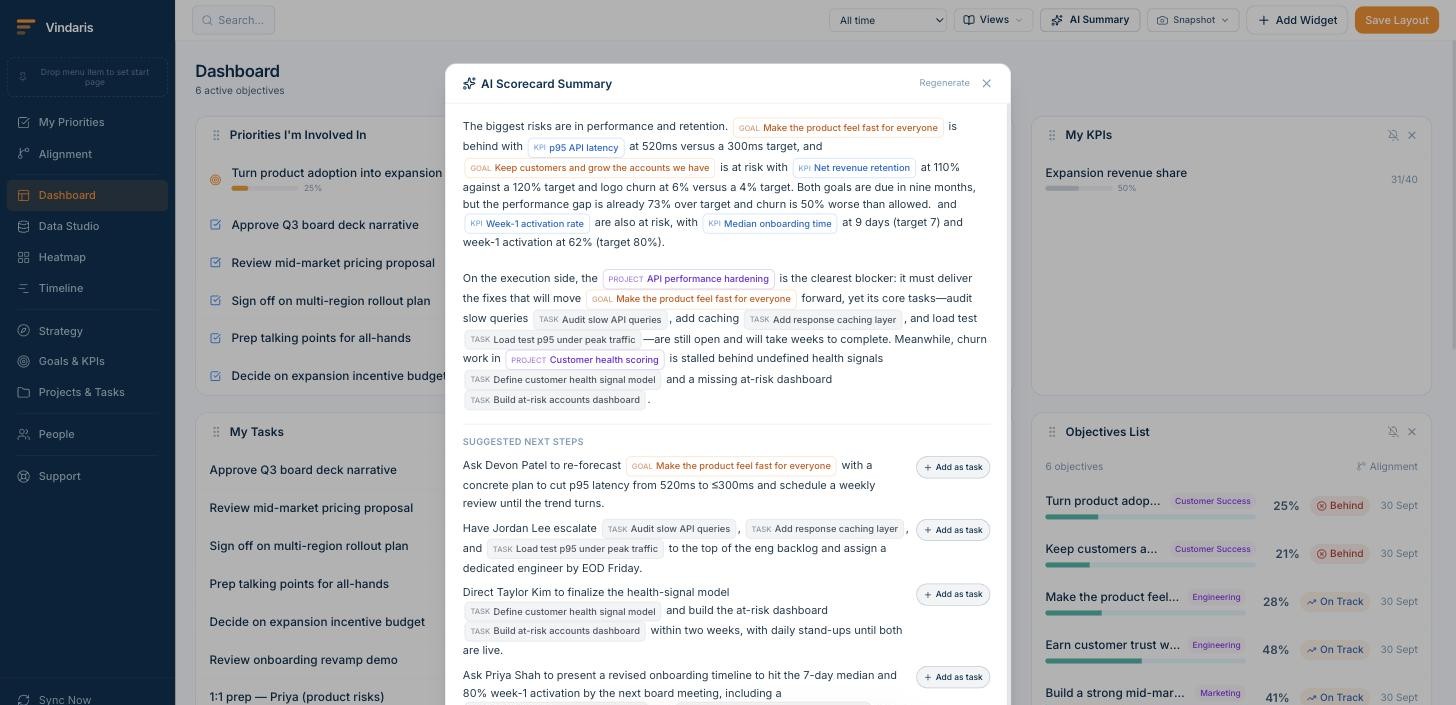
The AI summary names which objectives are behind, which initiatives are blocking them and what to ask whom, citing the specific goals, projects and tasks. Board pack week stops being a week.
- Every claim cites the object it came from.
- Suggested next steps become assigned tasks in one click.
See progress to plan for every team
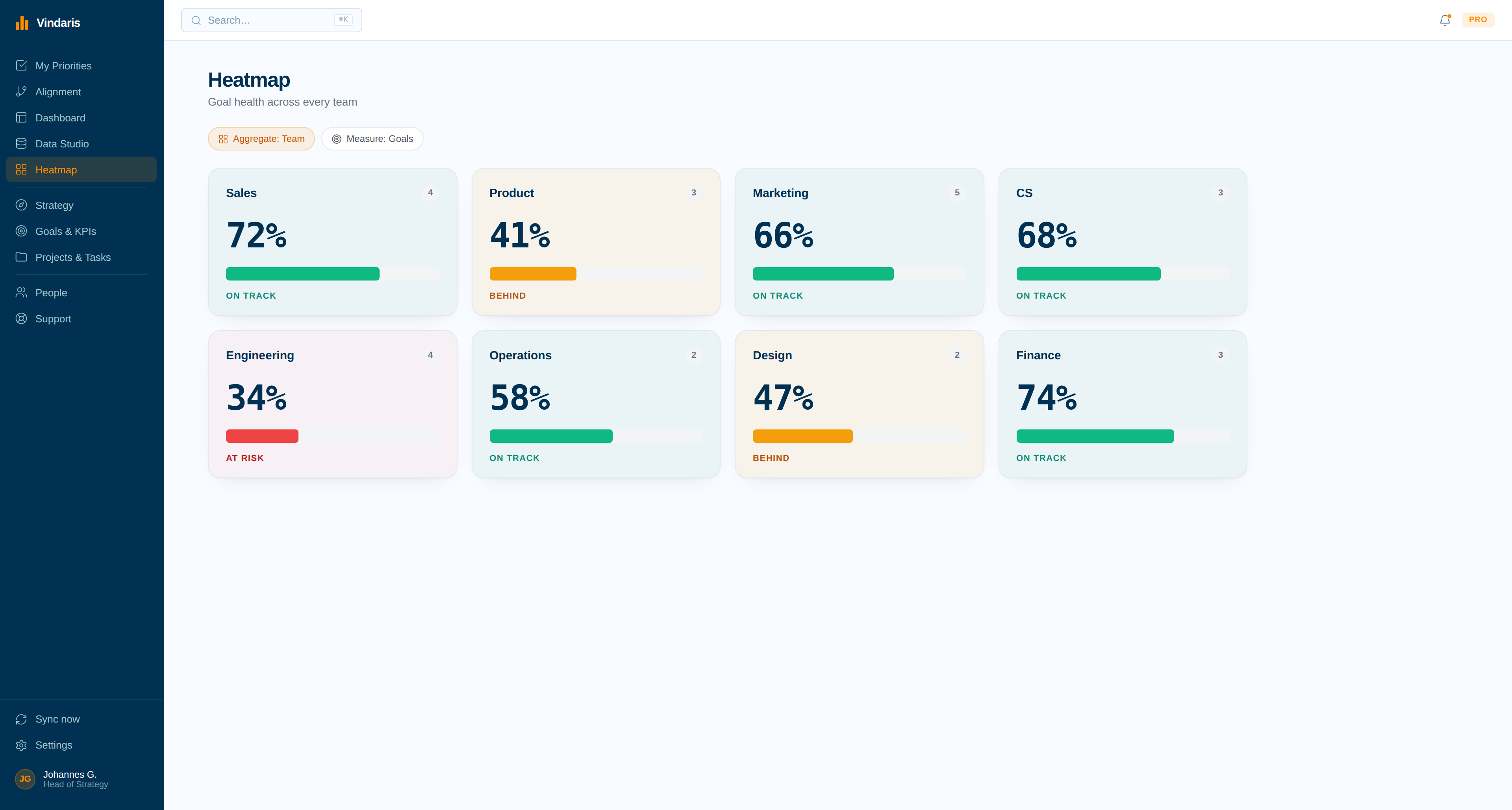
A tile per team and objective, shaded by progress against the plan rather than against the last update. The reforecast starts from what moved, not from a round of asking.
- Notified the moment a tile changes colour.
- Drill from a red tile into the initiative that stopped.
Get alerted when the plan slips
Twelve alert types watch the initiatives under each objective for stalls, blocked dependencies and effort trapped on work that was paused two quarters ago and never formally stopped.
- Effort trapped on paused initiatives, with the reallocation suggested.
- Alerts name the objective, the initiative and the blocking task.
Turn the offsite notes into the plan.
The plan leaves the room as prose on a whiteboard photo. Write it out, tag each @objective and @initiative, and it becomes a structure with owners and capacity attached before anyone opens a slide deck.
Four of the twelve alerts, aimed at plan drift.
A plan does not fail on the day it is missed. It fails over the months when the work quietly stops matching it, and these four alerts are what noticing looks like before the reforecast.
Twelve deterministic and AI-driven alerts watching for slipping work, broken routines and misaligned focus.
Your framework, your language, your data in Europe.
Vindaris fits the planning cycle you already run, annual or rolling, and keeps the plan connected to delivery for the three quarters after the offsite.
Plans in your framework
Vindaris ships without a prescribed methodology. Plan in OGSM, cascade with Hoshin Kanri, or run a plain set of annual bets, and rename every level to match the language your company already uses. One workspace holds all of it.
Free forever, including two integrations.
Free covers a complete plan with its objectives, initiatives, owners and capacity for up to 5 people. Pay when the planning group or the connected delivery tools grow.
Best for individual contributors, small teams or startups. No credit card required.
- All views: Canvas, My Priorities, Heatmap, Data Studio and Task Board
- Two integrations of your choice
- Up to four additional members
- Five ad-hoc AI risk summaries per month
Best for teams, small agencies, or departmental and team management.
- Everything in Free
- All integrations, unlimited sync
- Unlimited AI risk summaries and alignment suggestions
- Up to ten users in one organization
Best for multiple teams, exec teams, Chiefs of Staff or full-org deployments.
- Everything in Connect
- Unlimited users in one organization
- Direct human support, 24h response
- Human-led onboarding
For the week before the offsite.
Real Excel and PowerPoint files and browser tools that run without an account. Built for the week before the offsite, not the week after.
Common questions, answered
What is strategic planning software?
Strategic planning software helps organizations define a strategy, set goals, and plan the initiatives to deliver it. Vindaris is strategic planning software that connects the plan to the work executing it, so a strategic plan is tracked through real goals and tasks instead of closing as a slide deck after the planning offsite.
How is Vindaris different from a planning template or deck?
A template or deck captures the plan at a moment in time and goes stale as soon as work starts. Vindaris keeps the plan connected to the work delivering it through bidirectional sync, so progress and risk update automatically and the plan stays an accurate map of what the organization is actually doing.
Does it support OKRs, EOS, and KPIs?
Yes. Vindaris is framework-agnostic and supports OKRs, KPIs, EOS Rocks, OGSM, Hoshin Kanri, the Balanced Scorecard, and SMART goals, so you can plan with whichever framework your organization runs and keep one connected view across teams.
Does the strategic plan stay updated automatically?
Yes. Because each goal and initiative connects to the tasks and projects delivering it, plan progress rolls up from work activity as it moves. You do not maintain a separate planning document by hand; the plan reflects the current state of the work.
Stop closing the strategic plan as a slide deck. Connect it to the work.
Connect your first tool in 90 seconds. Free forever for planning and goal management.
Start planning freeNo credit card | No migration | No minimum contract
