Goal tracking software that shows everyone on your team their highest leverage work today.
Vindaris maps every goal to the tasks and projects delivering it in the tools your team already uses. It then reads what is actually happening there: work that stopped moving, effort going in while the number stays flat, tasks with no goal above them, and check-ins nobody did. That reading is what ranks each person's list.
Down to the individual task and the Slack thread around it, so the top of the list is the task actually holding the goal up.





What is goal tracking software?
Goal tracking software stores goals, records progress against them over time, and reports the result. Nearly every product in the category does the first and the third well. They differ almost entirely on the middle one, which is where the progress figure comes from.
What should goal tracking software actually track?
The work, not the goal. A goal has no state of its own; whatever number it shows was produced somewhere else, either by a system or by a person. Software that tracks only the goal is storing a person's summary, which is why so many tracked goals turn red in the last three weeks of a quarter.
How is this different from project management software?
Project management software organizes tasks and timelines within a project. Goal tracking sits above that and asks whether the projects add up to the outcome. The two are complementary, and the gap between them is exactly where most execution problems live.
Do we need goal tracking software if we use a spreadsheet?
Until the reporting cost exceeds the tracking cost, no. Spreadsheets fail on three things: rolling up across teams without manual formulas, keeping a history you can trust, and noticing that nothing has changed. The third one is what usually forces the move.
How often do goals need updating?
If someone has to answer that question, the tracking is manual. When a goal reads from the tasks feeding it, updates stop being a cadence and become a consequence, which also removes the incentive to report optimistically before a review.
 Click thru live demo
Pre-built workspace. No signup.
Click thru live demo
Pre-built workspace. No signup.
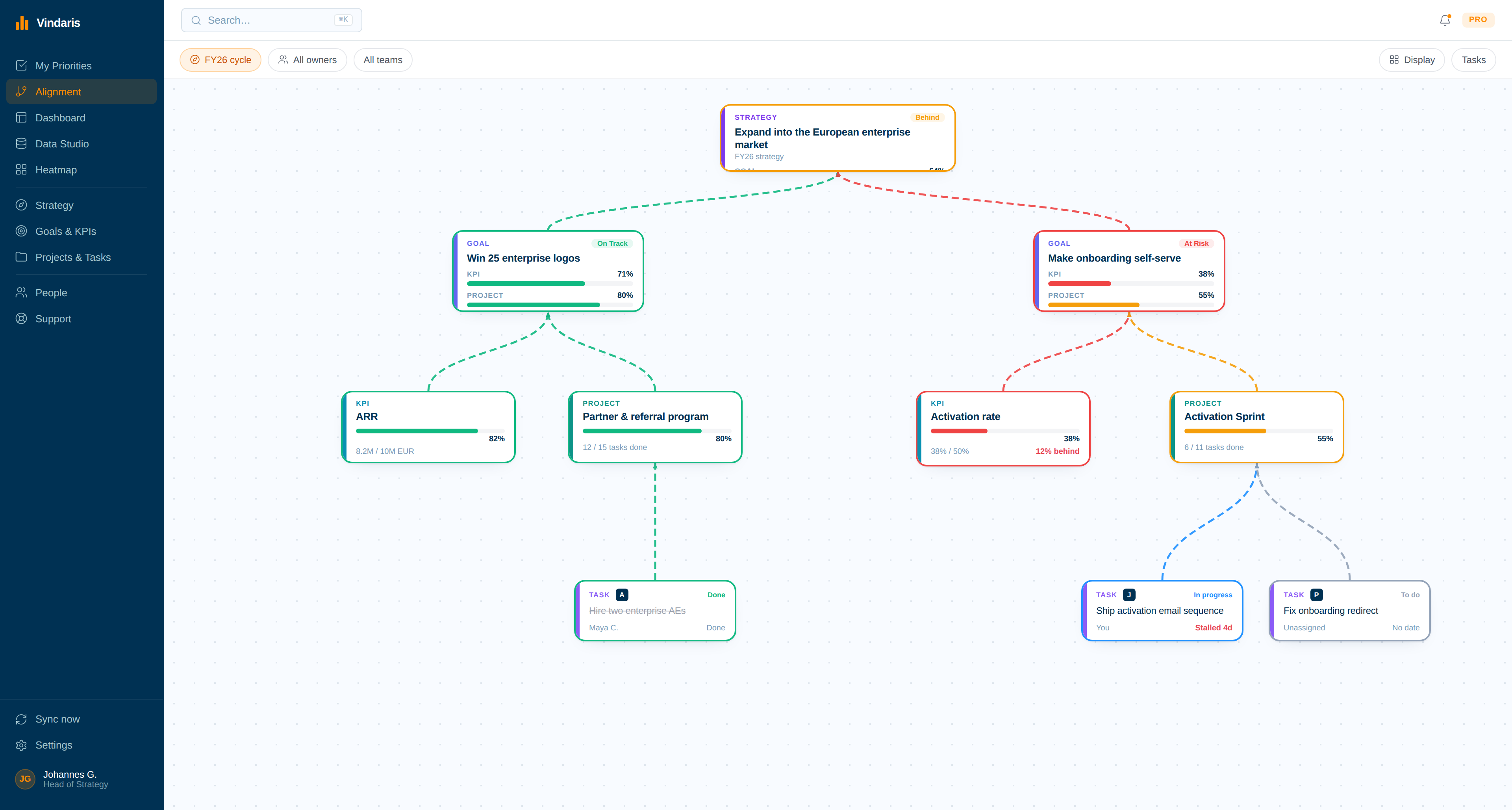
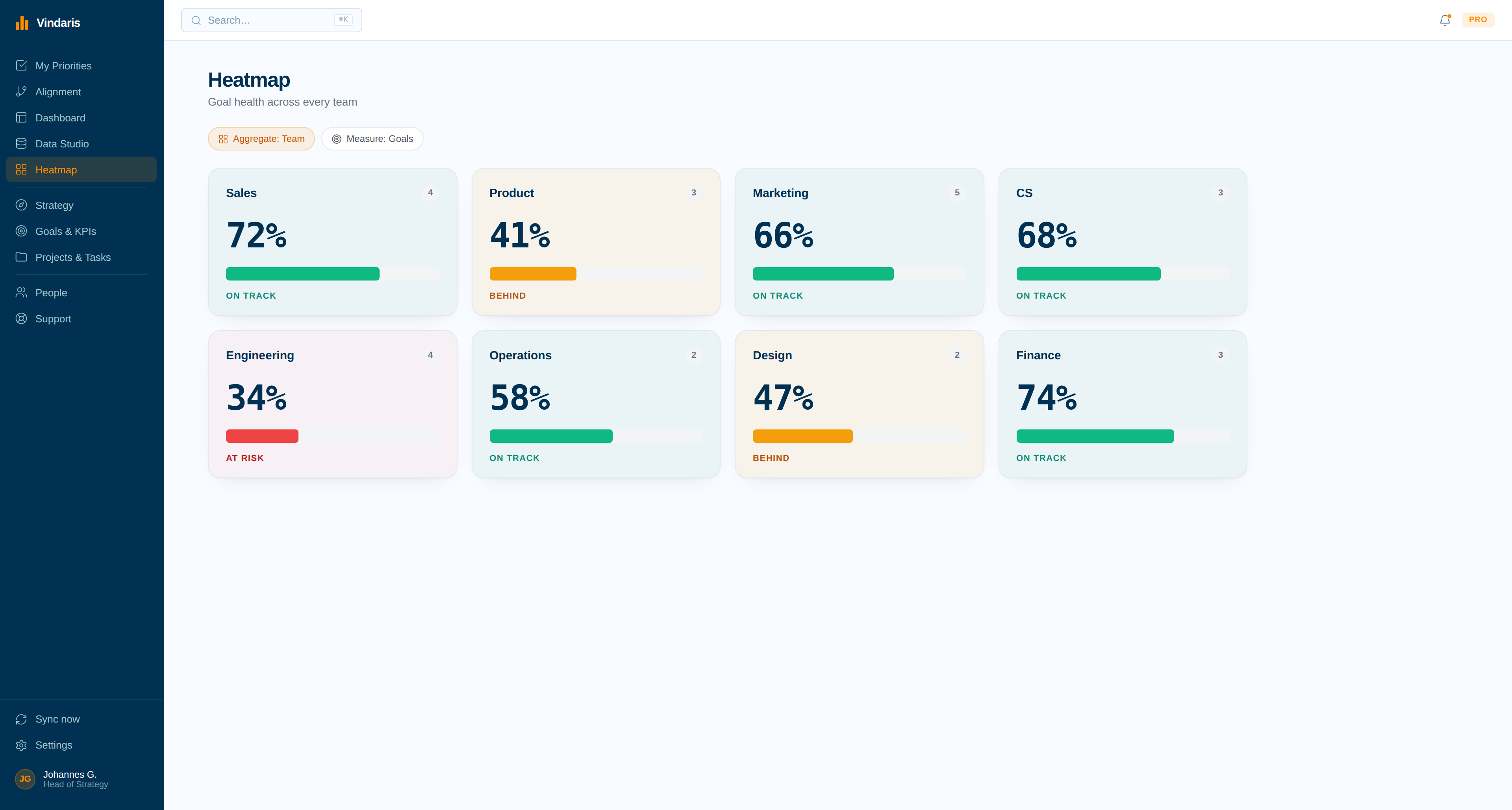
Every tracked goal on one board with the KPIs, projects and synced tasks producing its progress underneath it. Click through the live workspace, no signup.
A tracker that works before you switch.
Goal tracking fails in a specific way: not with a bad number, but with an old one that nobody noticed had stopped changing.
Tracking that nobody has to do.
Every tracker stores goals and reports progress. They differ on the one step in the middle: who produces the number. In Vindaris nothing produces it, because it is read from the work.
The update stops existing
Progress is derived from the state of the connected tasks, so there is no cadence to enforce, no reminder to send, and no incentive to round a figure up before a review.
Work stays where it lives
Connect HubSpot, Jira, Planner, Asana and Google Tasks. Tracking stops being something people do to a goal and becomes something the goal does for itself, from the tasks feeding it.
A goal that has gone quiet says so
The hardest thing for a tracker to notice is nothing happening. The Work Graph flags a goal with no active work behind it, which is the state a spreadsheet shows as unchanged and therefore fine.
Connect the tools that make tracking automatic
Plug in HubSpot, Microsoft Planner, Google Tasks, Asana or Jira. This is the step that removes the update: once the work is connected, there is nothing left for anyone to report.
- A task closed in Jira closes in Vindaris, and back again.
- Every synced task keeps a tag pointing at its source tool, so progress is checkable rather than asserted.
Give each person their own tracked list
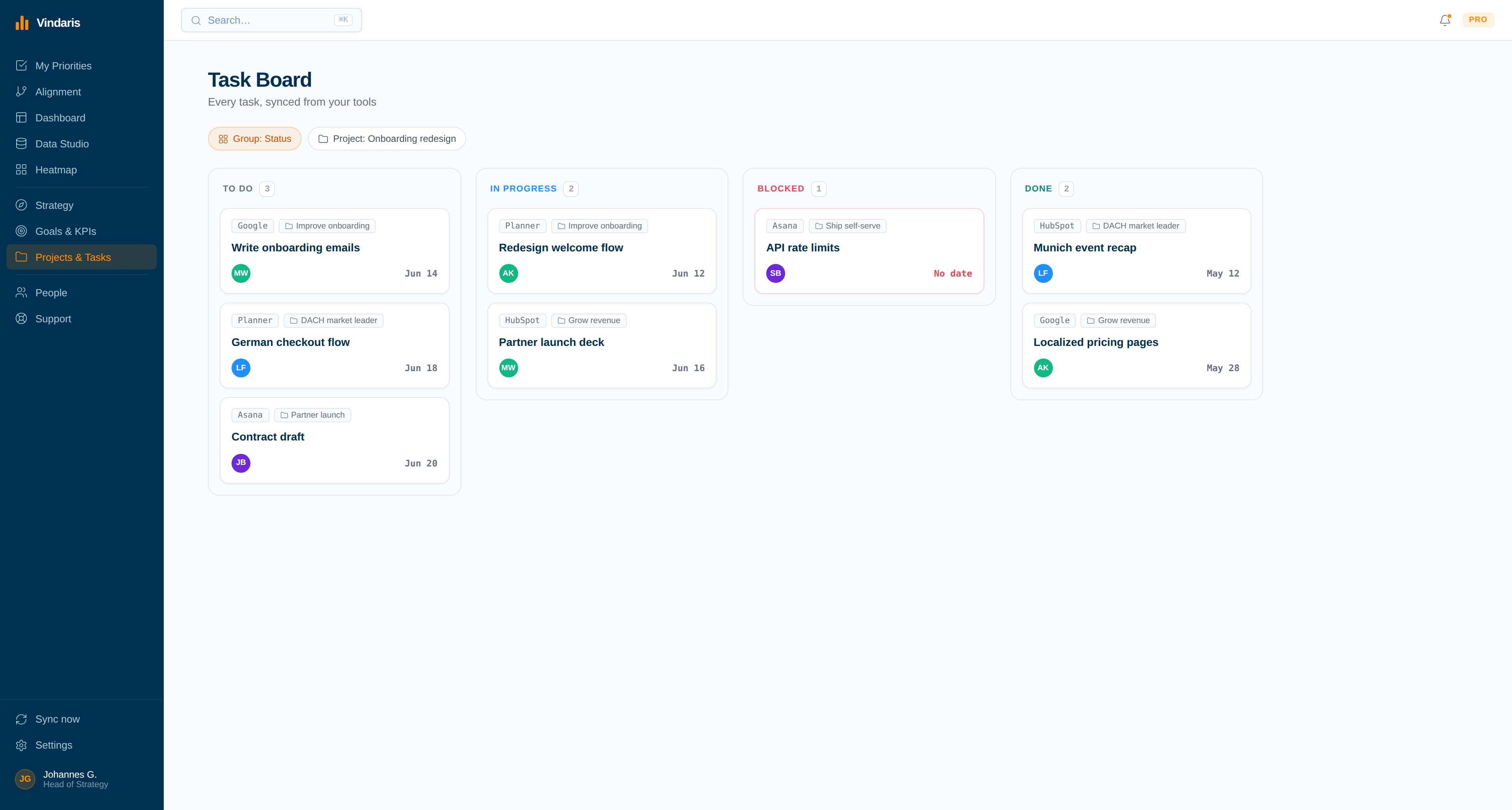
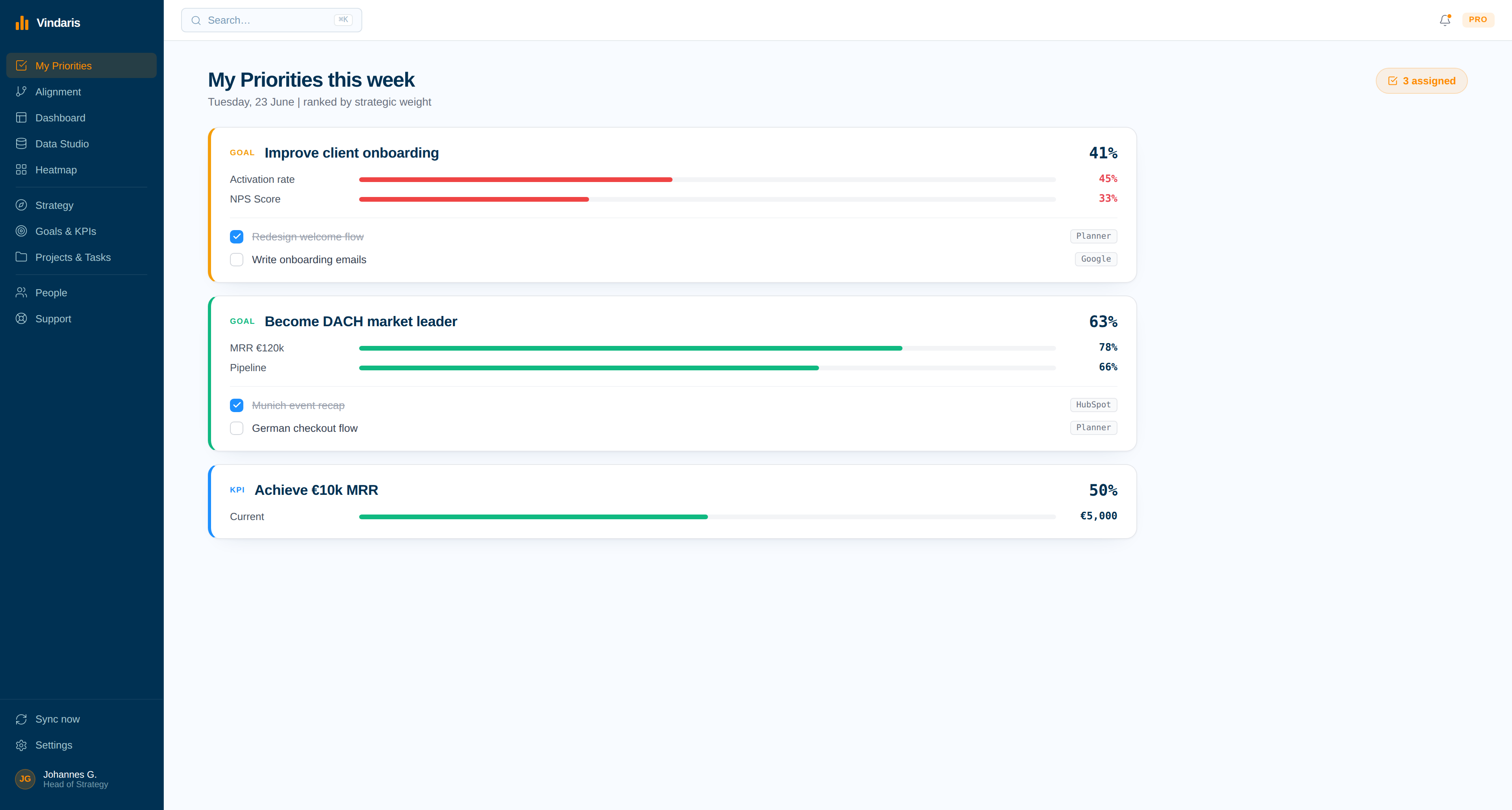
One ranked list per person of the goals they own and the tasks feeding them, drawn from every connected tool. Tracking becomes a thing people read in the morning rather than a form they fill on Friday.
- Ranked by what it affects upstream, not by who asked last.
- Everything assigned to one person, across every tool, in one place.
Roll it up without assembling anything
Every team, person or goal as a tile shaded by progress against plan. The monthly roll-up that used to be a spreadsheet exercise is a screen that was already correct.
- Notified the moment a tile changes colour.
- Click any tile to drill into the work behind it.
Let tracking run itself
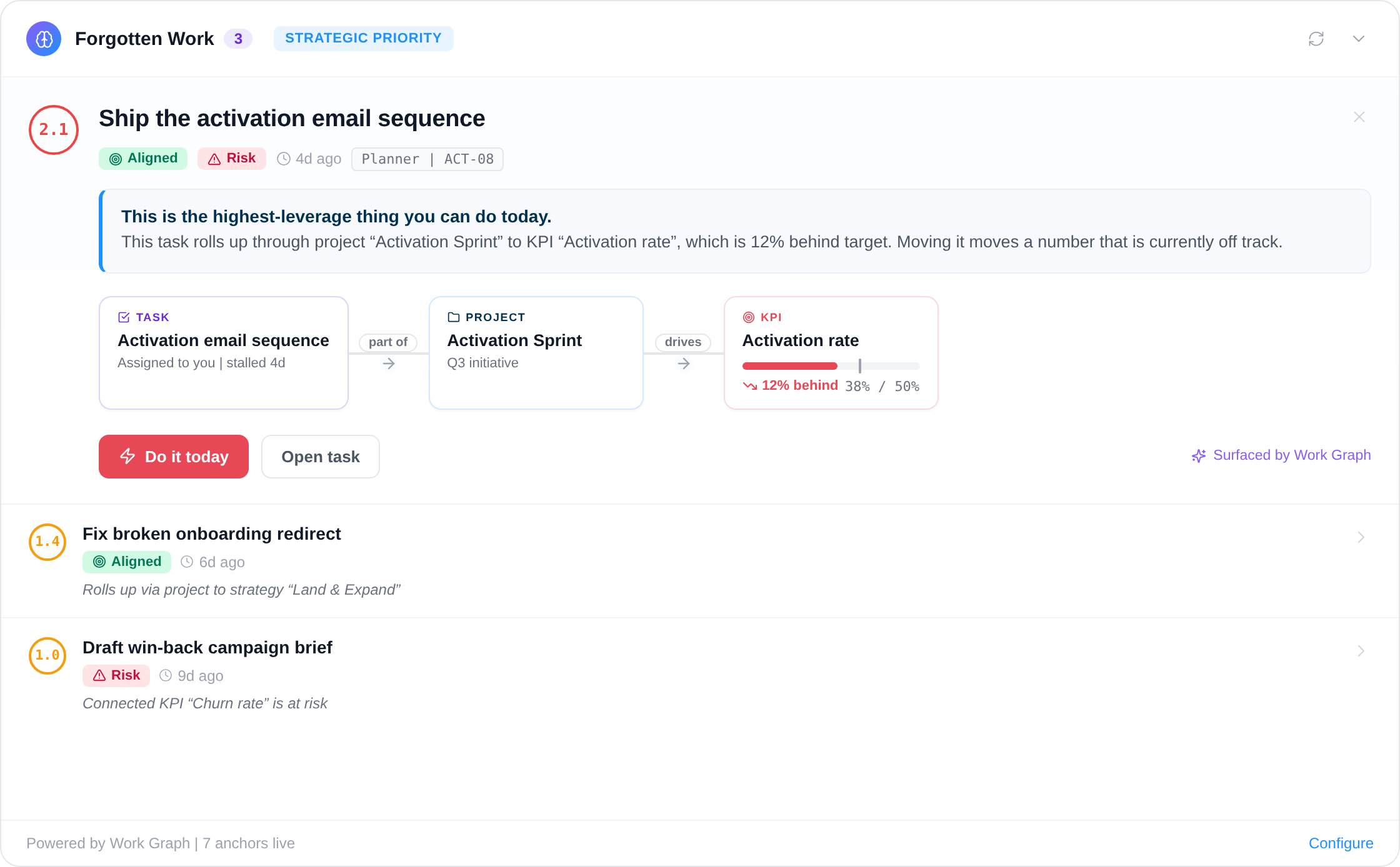
Twelve alert types watch the work behind each goal for stalls, pace falling off and effort drifting elsewhere. The owner is told, with the specific task named, rather than discovering it at the next roll-up.
- A goal with no active work is flagged rather than left flat.
- Scheduled summaries land in Slack, Teams or email.
Setting the goals, not just tracking them.
Vindaris works as a goal tracker app for one person, a goal tracker for one team, and goal setting software for a whole company, in a single workspace. Track OKRs, KPIs, SMART goals and EOS Rocks side by side, free forever up to five people.
Write the goals the way you would say them
Describe the quarter in plain language and Vindaris maps it onto the canvas, or build the goals directly. There is no enforced syntax and no required hierarchy, so goal planning software stops fighting the way your company already talks and starts following it.
Employee goal setting on the same map as the company's
Employee goal setting software usually lives beside a performance review, disconnected from the work. Here each person's goals sit on the same map as the team and company goals above them, so an individual can see what their quarter is for and a manager can review every direct report in one view without asking for a document.
Goal reporting without the reporting round
Because progress comes from the connected work, goal reporting software stops meaning a weekly collection exercise. Save any view as a report, schedule it into Slack, Teams or email, and compare week over week or quarter over quarter without anyone assembling it.
One objective tracker for every framework you run
Most goals software holds a single format, and a goals tracker that only holds one forces a second tool the moment a team changes approach. Vindaris works as an objective tracker across OKRs, KPIs, SMART goals and EOS Rocks at once, so leadership keeps a single view while each team keeps the format that suits it.
Write the list once, never maintain it.
Type the goals you want tracked and who owns them, tag them with @, and the structure appears with the connected work already hanging underneath. Nothing about it needs updating afterwards.
Four of the twelve alerts, so tracking notices things.
The hardest thing for a tracker to see is nothing happening. A spreadsheet shows an untouched goal as unchanged, which looks identical to fine. These four are the alerts that tell the difference.
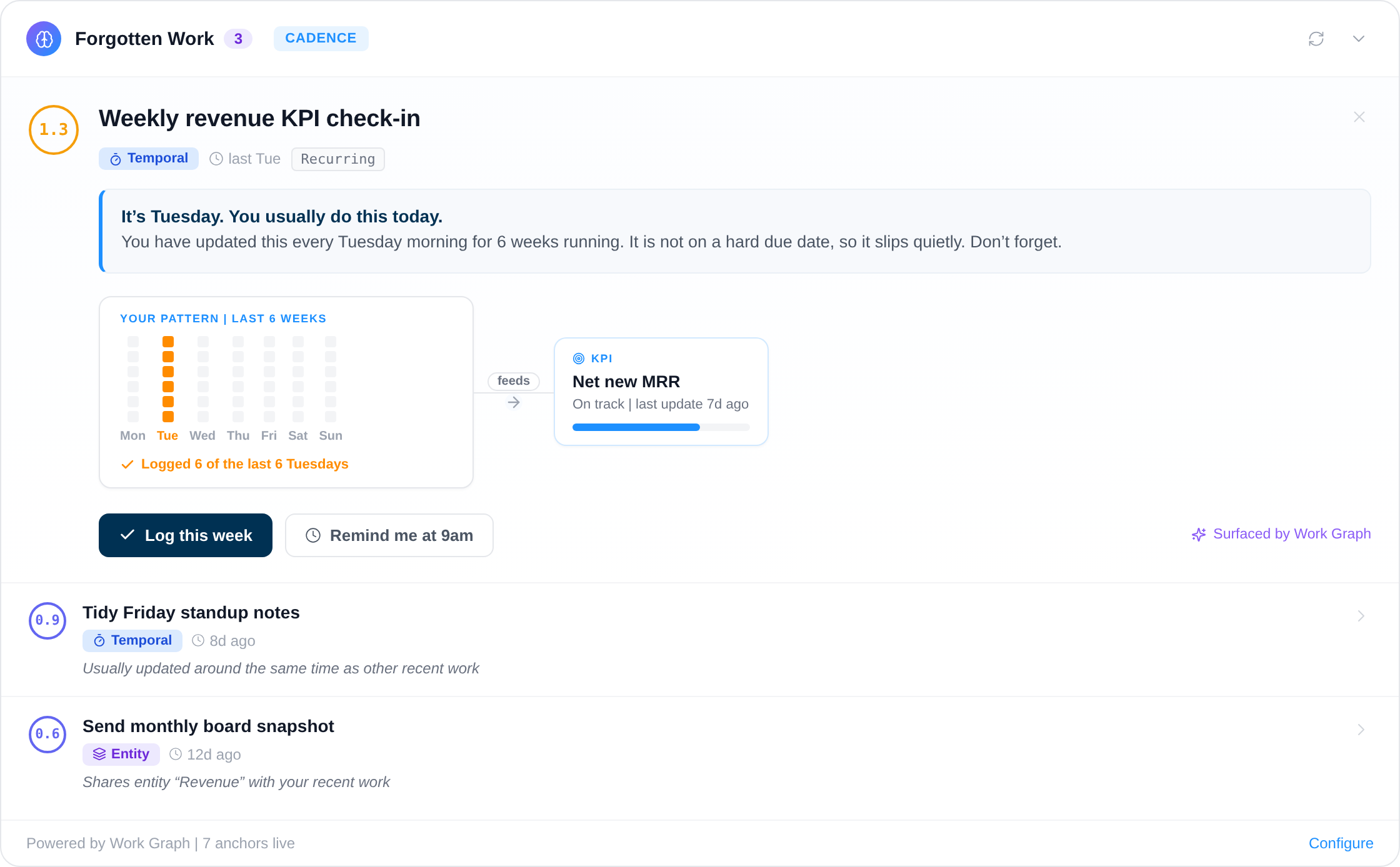
Twelve deterministic and AI-driven alerts watching for slipping work, broken routines and misaligned focus.
Your framework, your language, your data in Europe.
Vindaris fits whichever goal syntax your teams already use, because the tracking problem is the same underneath and switching syntax should not mean switching tools.
Tracks goals in any framework
Vindaris ships without a prescribed methodology, so OKRs, KPIs, SMART goals and EOS Rocks are all tracked the same way in one workspace. Teams keep the format that suits them while leadership keeps a single connected view of progress.
Free forever, including two integrations.
Free is a working tracker for a team of five, with two integrations and automatic progress. It is not a fourteen-day window, and there is no card to enter.
Best for individual contributors, small teams or startups. No credit card required.
- All views: Canvas, My Priorities, Heatmap, Data Studio and Task Board
- Two integrations of your choice
- Up to four additional members
- Five ad-hoc AI risk summaries per month
Best for teams, small agencies, or departmental and team management.
- Everything in Free
- All integrations, unlimited sync
- Unlimited AI risk summaries and alignment suggestions
- Up to ten users in one organization
Best for multiple teams, exec teams, Chiefs of Staff or full-org deployments.
- Everything in Connect
- Unlimited users in one organization
- Direct human support, 24h response
- Human-led onboarding
A tracker that works before you switch.
Real Excel and PowerPoint files and browser tools that run without an account. Most teams start with the tracker template and move once it stops scaling.
Common questions, answered
What is goal tracking software?
Goal tracking software lets teams monitor progress toward their goals over time. Vindaris is goal tracking software that connects each goal to the tasks and projects delivering it, so progress and risk update automatically from work activity instead of a status number entered by hand before each review.
How does Vindaris track goal progress automatically?
Each goal connects to the tasks and projects delivering it through bidirectional sync with tools like HubSpot, Planner, Asana, and Google Tasks. As that work moves, progress rolls up on its own, so the tracked status is derived from work activity rather than a field someone updates manually.
Can I track OKRs and KPIs together?
Yes. Vindaris is framework-agnostic, so you can track OKRs, KPIs, SMART goals, and EOS Rocks side by side in one place. Leadership keeps a single view of progress across every framework the teams run.
Is there a free goal tracking app?
Yes. Vindaris is free forever for goal tracking, including the full Alignment Canvas and two integrations, with no credit card. It works as a free goal tracker for one person or a small team, and moves to a paid plan only when you add more people or more integrations. Everything in the free plan is the product, not a trial.
What is the difference between goal tracking and goal setting software?
Goal setting software is where you decide what the goals are and write them down. Goal tracking software is what tells you afterwards whether they are moving. Vindaris does both in one place, which matters because a goal written in one tool and tracked in another drifts apart within a quarter. Set the goals on the canvas, connect the work, and tracking runs from the work itself.
Can I use Vindaris as a goal setting app for a team?
Yes. Write goals in plain language and Vindaris maps them onto the canvas, or build them directly. Each person's goals connect upward to the team and company goals they support, so an individual can see what their quarter is actually for. Different teams can use different formats in the same workspace.
How does Vindaris decide which goal to show me first?
Your list is ordered by what each item moves upstream, not by which deadline is nearest. Vindaris reads four things continuously: whether a goal is on pace, whether effort is going in without the number moving, whether work has a goal above it at all, and whether the check-in routine has lapsed. The task with the largest effect on a goal that needs attention goes to the top.
How is this different from a habit tracker?
It is built for teams rather than individuals. A habit tracker records whether you did something; Vindaris connects a team's goals to the work in Jira, Asana or Planner that delivers them and shows who should do what next. If you want to track personal habits or a daily streak, a habit tracker is the better tool, and our best goal tracking apps guide compares them.
Does it work as employee goal setting software?
Yes. Every person's goals sit on the same map as the team and company goals above them, so a manager can review all their reports' goals in one view without asking for a document, and each person can see how their work connects upward. Reviews open on the work rather than on a self-reported score.
Does it integrate with Slack?
Yes. Vindaris reads the Slack conversation around a task, not just the task's status, which is how it can name the specific blocker behind a goal. Alerts and scheduled summaries can also be delivered into Slack, Teams or email on whatever schedule the owner prefers.
Stop updating a goal tracker by hand. Track the work instead.
Connect your first tool in 90 seconds. Free forever for goal management.
Start tracking goals freeNo credit card | No migration | No minimum contract
