Planning with cycles
Define cycles like "Q1 2026", use them as filters everywhere, then close, copy or extend a cycle when the period turns.
Good fit if you run on quarters or halves and want every goal, KPI and project to share the same time boxes.
Cycles are the named time boxes your organization plans in: Q1 2026, H1 2026, FY26. Define them once and they appear as quick presets in every date picker and as a filter on Goals, Projects, the heatmap and Data Studio, so the whole workspace agrees on what "this quarter" means.
Create a cycle
Cycles are managed by admins.
- Open Admin → Cycles & Strategies.Only Owners and Admins can create or change cycles.
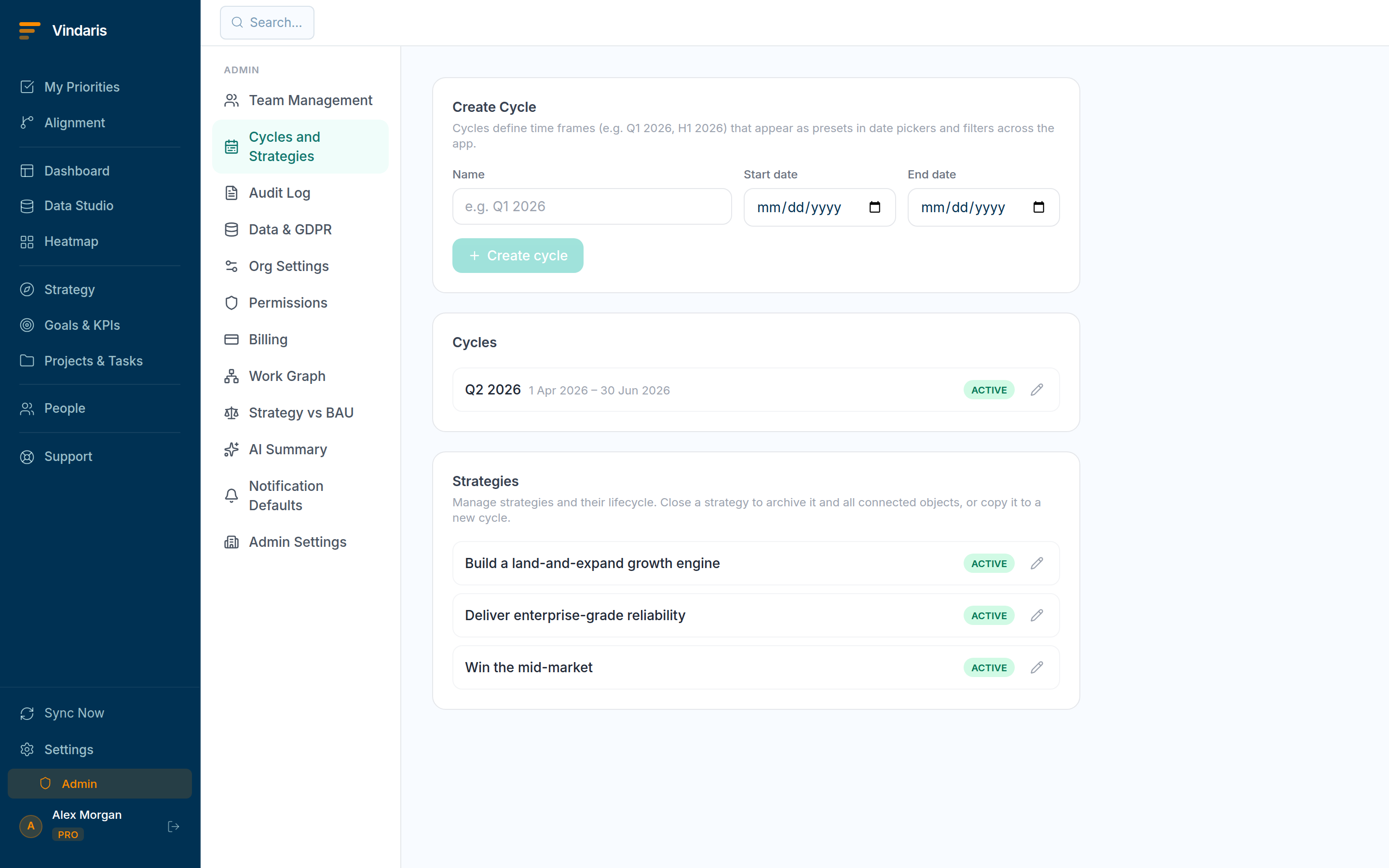
Admin → Cycles: define the periods everyone plans in. - Enter a Name (e.g. "Q1 2026"), a Start date and an End date, then click "Create cycle".
- Switch to Goals or Projects and use the cycle filter to scope the view to that period.The filter groups active cycles first, then past ones, with a "Custom dates…" escape hatch.
Close, copy or extend
- Close a cycle to archive it and mark everything inside it complete.Closing marks all goals, KPIs, projects and tasks whose dates match the cycle as completed/done, the clean way to retire a quarter.
- Copy a cycle to roll the plan forward.Copy creates a new cycle and duplicates the matching goals, KPIs, projects and tasks. Alignment and ownership are preserved; status and progress reset to zero so you start the new period fresh.
- Extend a cycle to push its end date.Extending moves the cycle end and updates the dates of everything matched to it, useful when a quarter slips a couple of weeks.
A date passing changes nothing on its own. Stale "active" goals from last quarter pile up and pollute every view. Closing a cycle draws a hard line: last period's work is archived as done, this period starts clean, and your dashboards stop mixing the two. Copy-forward then gives you next quarter's skeleton in one click instead of rebuilding the tree by hand.
When teams reach for this
A cycle is a named time box like Q1 2026 that goals, KPIs and projects are planned against. Admins define cycles, everyone filters by them across the product, and when a period turns you close, copy or extend the cycle in one place.
Who it helps
Vindaris fits the admin or strategy-ops lead who sets the planning rhythm, the PMO that reports by period, and the leaders who open and close each quarter. It suits scale-ups and mid-market companies, roughly 30 to 500 people and multi-team, that run a formal quarterly or half-year cadence across the org.
Why it helps
At that size each team drifts into its own idea of this quarter unless one calendar is shared, which makes roll-ups and comparisons mushy. Cycles give every goal, KPI and project the same time boxes, so a period means the same thing everywhere and closing it is a clean event rather than a slow fade.
In practice
- Put the whole org on one calendar. Define cycles once and every goal, KPI and project can be filtered by the same periods, so each team's this quarter lines up with everyone else's. Reports and comparisons across teams hold, because they are cut on the same time boxes.ExampleAn admin creates H1 2026 and Q1 2026, and every team's board and dashboard can filter to the same quarter without each defining its own dates.
- Close a cycle cleanly when the period turns. Closing a cycle marks the period done and preserves its record, so the quarter you just finished stays intact for the review instead of blurring into the next one. You get a definite line between what was committed then and what is committed now.ExampleAt quarter end the strategy-ops lead closes Q1, and the Q1 numbers freeze for the QBR while Q2 planning starts on a clean slate.
- Copy or extend instead of rebuilding. When a period rolls over, copy a cycle's structure into the next one or extend the current cycle, so planning carries forward from a frame that already exists. The next period's cadence is in place with a click rather than rebuilt by hand.ExampleRolling into Q2, the admin copies the Q1 cycle structure, adjusts the dates, and every team starts Q2 with the frame already in place.
Vindaris maps your strategy, goals and KPIs down to every project and task, and the Work Graph flags execution risk wherever effort has drifted from the goal, with task-level context down to the Slack thread.
Put this into practice
Vindaris keeps strategy, goals, projects and tasks in one place, and the Work Graph flags execution risk before it costs you. Start free, no credit card.
Sign Up for Free