Preparing for a QBR
Pull a defensible quarter-in-review across strategy, goals and outcomes, including the work you archived.
Good fit if you rebuild the quarterly review by hand every quarter from five different tools.
A QBR is the highest-stakes report you'll assemble. It has to be accurate about what was committed and credible about what comes next quarter. Because Vindaris kept the record all quarter, you assemble the QBR rather than excavate it.
Assemble the quarter
- In Data Studio, build a Goals view filtered to the quarter's timeframe, grouped by strategy.This is your "what we committed to" backbone: every goal that was meant to land this quarter.
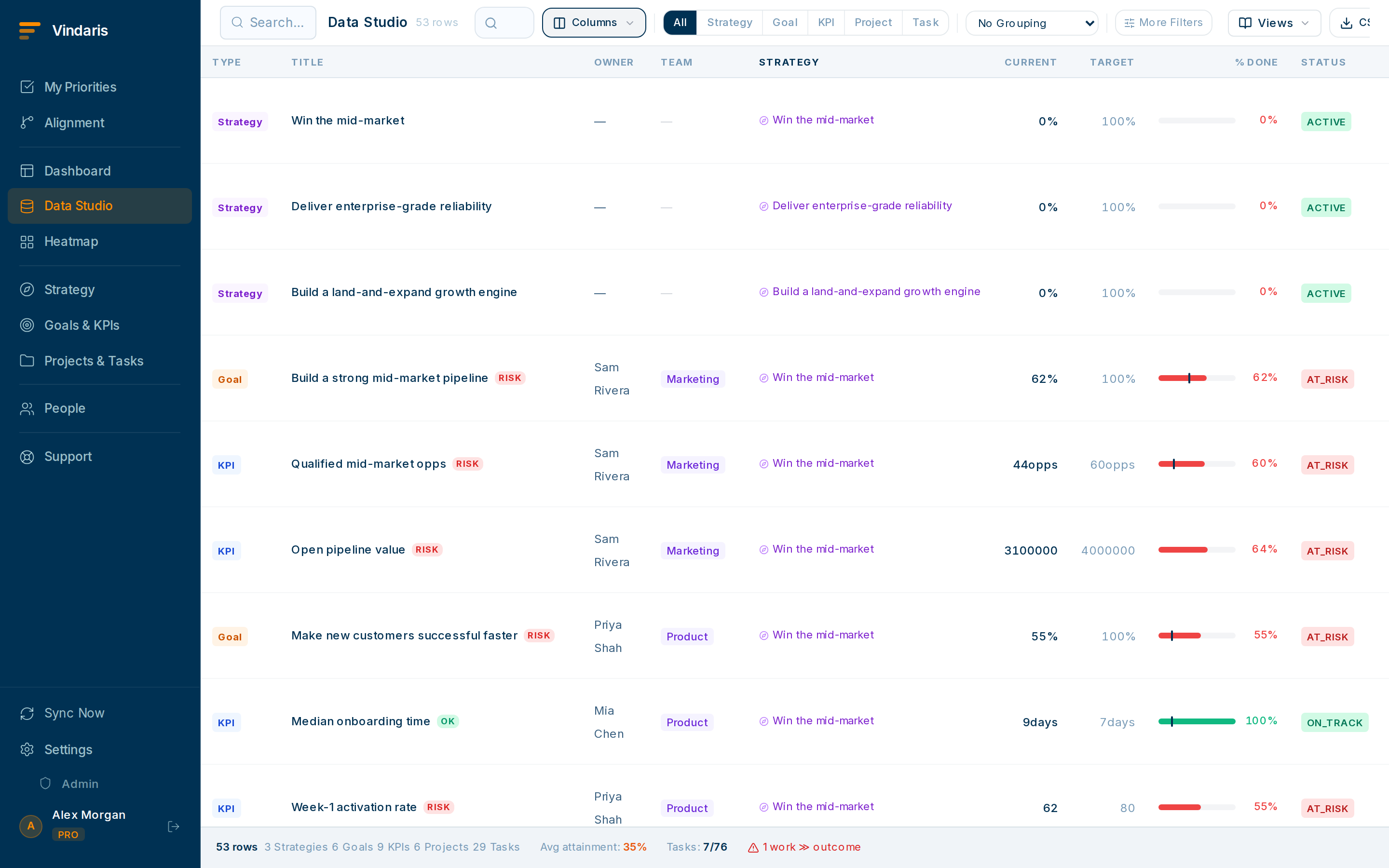
Commitments vs. outcomes, by strategy, for the whole quarter. - Show final percent complete, whether each key result hit its target, and the end-of-quarter health.Be plain about misses: a QBR that hides them loses the room.
- Include archived projects in the view.Completed-and-archived work is part of the story. Archived items stay searchable precisely so QBRs can account for them.
- For the narrative, generate the AI scorecard if available and edit it into your voice.It drafts a neutral executive summary from the goal data; you add judgement and the "what we learned".
- Seed next quarter while you're here.A QBR is also planning. Create next quarter's goals and link them to the strategies they serve so the new period starts populated.
Because progress was tracked against real key-result values via check-ins all quarter, not reconstructed the week before. There's a dated trail of how each number moved, so "how do we know?" has an answer. That continuous record is the difference between a QBR you defend and one you survive.
Name the view "QBR: [quarter]" and keep it. Next quarter, duplicate the structure and just change the timeframe filter. Your QBR prep gets faster every cycle.
When teams reach for this
Because Vindaris kept the strategy-to-task record current all quarter through check-ins, the QBR is something you assemble in Data Studio rather than excavate the night before. The view holds what was committed, what landed, and the dated trail behind every number.
Who it helps
Vindaris fits the CEO, founder or Chief of Staff who presents the QBR or board review, and the PMO or strategy-ops lead who assembles the pack. It suits scale-ups and mid-market companies, roughly 30 to 500 people, that run a real quarterly cadence across several teams.
Why it helps
At that size the quarterly pack is pulled by hand from several tools and a stack of Slack threads, which costs a week and still cannot answer "how do we know?" live in the room. Because Vindaris kept the record all quarter, the review is a live view with a dated trail behind every number, so the pack assembles in an afternoon and the numbers hold up when the board asks how they were reached.
In practice
- Run the review off live data. Vindaris keeps the goal, key-result and project record current all quarter, so the QBR is a live view you open in the room rather than a deck you rebuild by hand. When someone asks about a number, you filter to it in the moment.ExampleMid-meeting a board member questions the revenue goal, and you click into it to show the key-result history and the projects under it live, without leaving the review.
- Be plain about misses and still hold the room. The view shows final percent complete, whether each key result hit its target, and end-of-quarter health, including the goals that missed. Because progress was tracked against real values all quarter, a miss arrives with the dated reason it happened, which is what makes the review credible.ExampleThe "expand to three regions" goal landed at two of three. The view shows the third launch stalled in week six on a vendor block, so the miss is explained before anyone asks.
- Turn the review into next quarter's plan. A QBR is also planning, so you seed next quarter's goals in the same view and link them to the strategies they serve, and the new period starts populated. Archived projects stay searchable, so completed work still counts in the story.ExampleWhile closing Q3 you create the Q4 goals under the same strategies and link an unfinished migration as a Q4 project, so Q4 opens already mapped.
Vindaris maps your strategy, goals and KPIs down to every project and task, and the Work Graph flags execution risk wherever effort has drifted from the goal, with task-level context down to the Slack thread.
Put this into practice
Vindaris keeps strategy, goals, projects and tasks in one place, and the Work Graph flags execution risk before it costs you. Start free, no credit card.
Sign Up for Free