Business review software that finds the miss weeks before the review does.
Map your strategy, goals and KPIs, then connect the tools the work lives in. Vindaris reads pace and focus against plan all quarter and flags execution risk as it forms, so the QBR and the monthly review open on data that is already current and already explained. The meeting confirms decisions instead of discovering problems.
Task-level context down to the Slack thread, so any number on the review screen can be traced to the work that produced it.





What is business review software?
Business review software runs the recurring meetings where leadership checks progress against goals: the quarterly business review, the monthly business review, and the weekly rhythm underneath them. Most tools in the category help you assemble the review. Vindaris removes the assembly, because every goal is connected to the tasks and conversations delivering it, and the review opens on data that was current all along.
QBR vs MBR: which cadence does what?
The QBR scores the quarter and re-plans; the MBR checks trajectory monthly and makes small corrections so the QBR is never the first place a problem is noticed. Templates for both are in the library: the QBR template and the monthly business review template.
What does a review actually need from the data?
Three things: the score against plan, the reason behind any gap, and enough context to decide. A slide carries the first. The other two live in the work, which is why review prep normally means interviewing owners. Vindaris carries all of it upward automatically, down to the Slack thread where scope changed.
Why do reviews find problems late?
Because the review is usually the first moment anyone assembles the whole picture. The miss began weeks earlier as stalled tasks and drifting focus, states a status field cannot express. By the time the number moves, the quarter is nearly spent. The fix is watching the work continuously, and that is a system, never a meeting format.
What changes when the review runs on live data?
The meeting gets shorter and moves earlier in the causal chain. Nobody reads status aloud, because it is on screen and traceable. Time goes to the two or three goals the Work Graph flagged, and to decisions: continue, stop, re-resource. The review becomes a formality in the best sense, confirmation of what the graph already showed.
 Click thru live demo
Pre-built workspace. No signup.
Click thru live demo
Pre-built workspace. No signup.
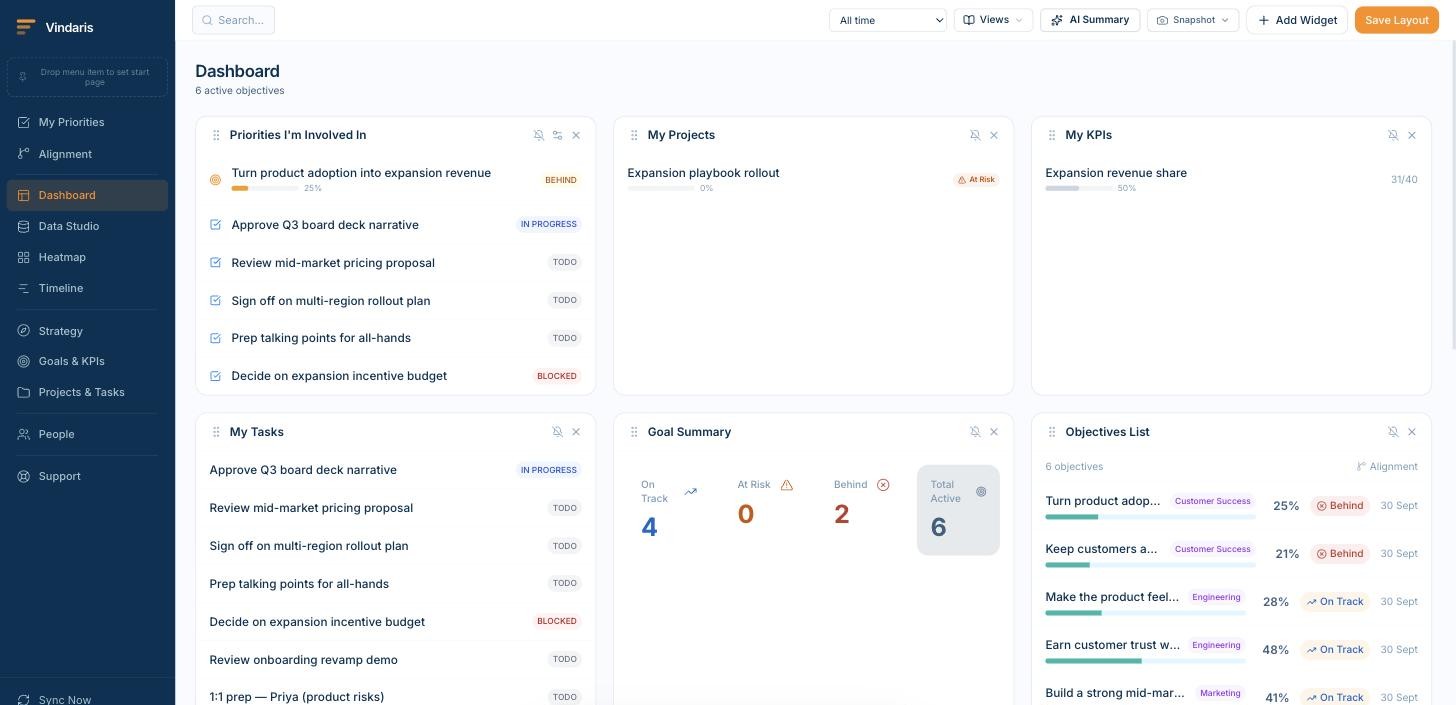
The review view: every goal scored against plan, every score traceable to the projects and synced tasks underneath it. Click through the live workspace, no signup.
The review cycle, without the assembly.
Business reviews fail in a specific way: the meeting becomes the deadline for finding out what happened, and by then the quarter is nearly spent.
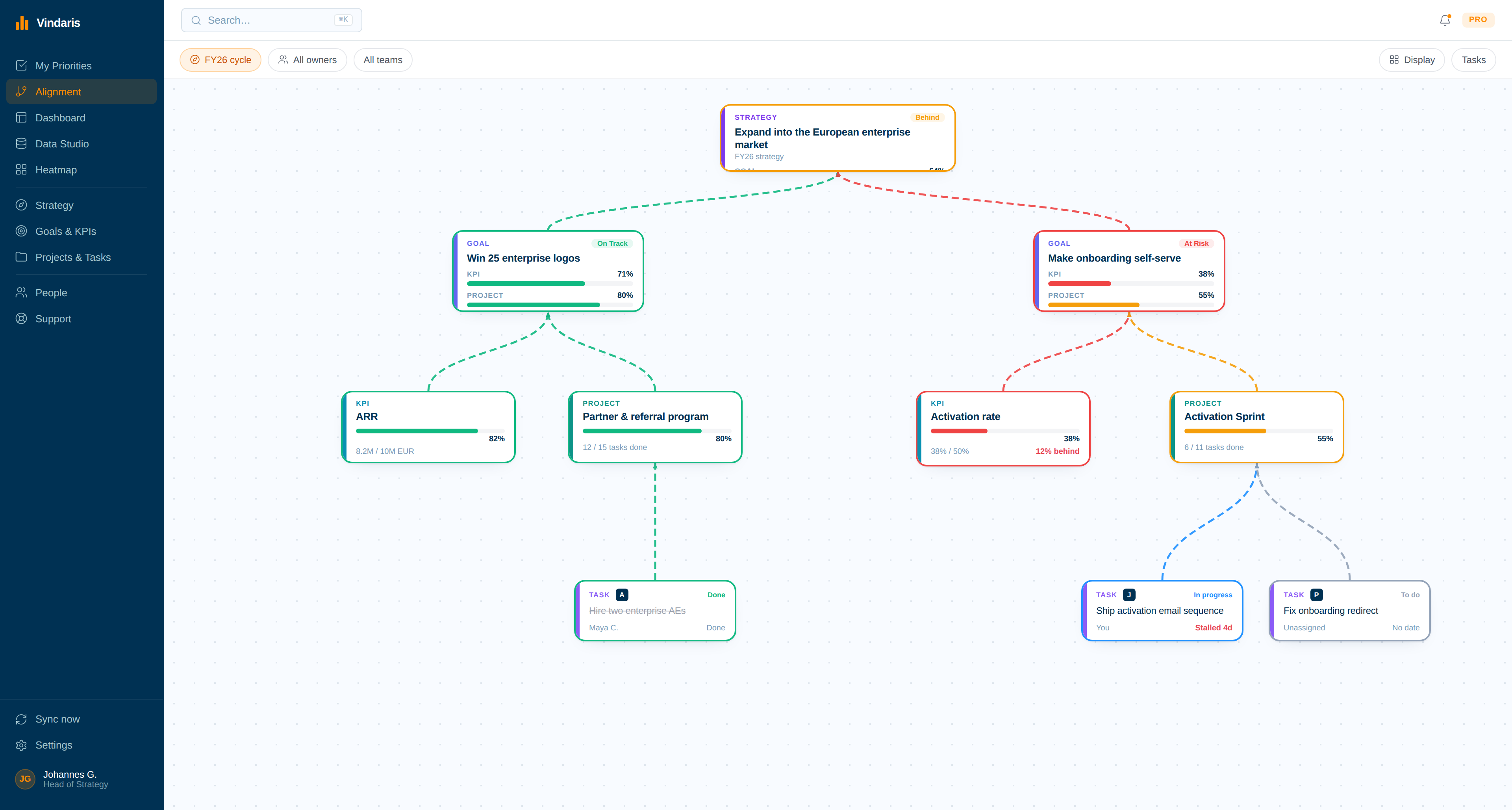
Reviews that start where others end.
Most review software helps you collect status. Here there is no collection step: progress and risk are read from the connected work, so the review starts from a picture that is already complete.
Risk is flagged as it forms
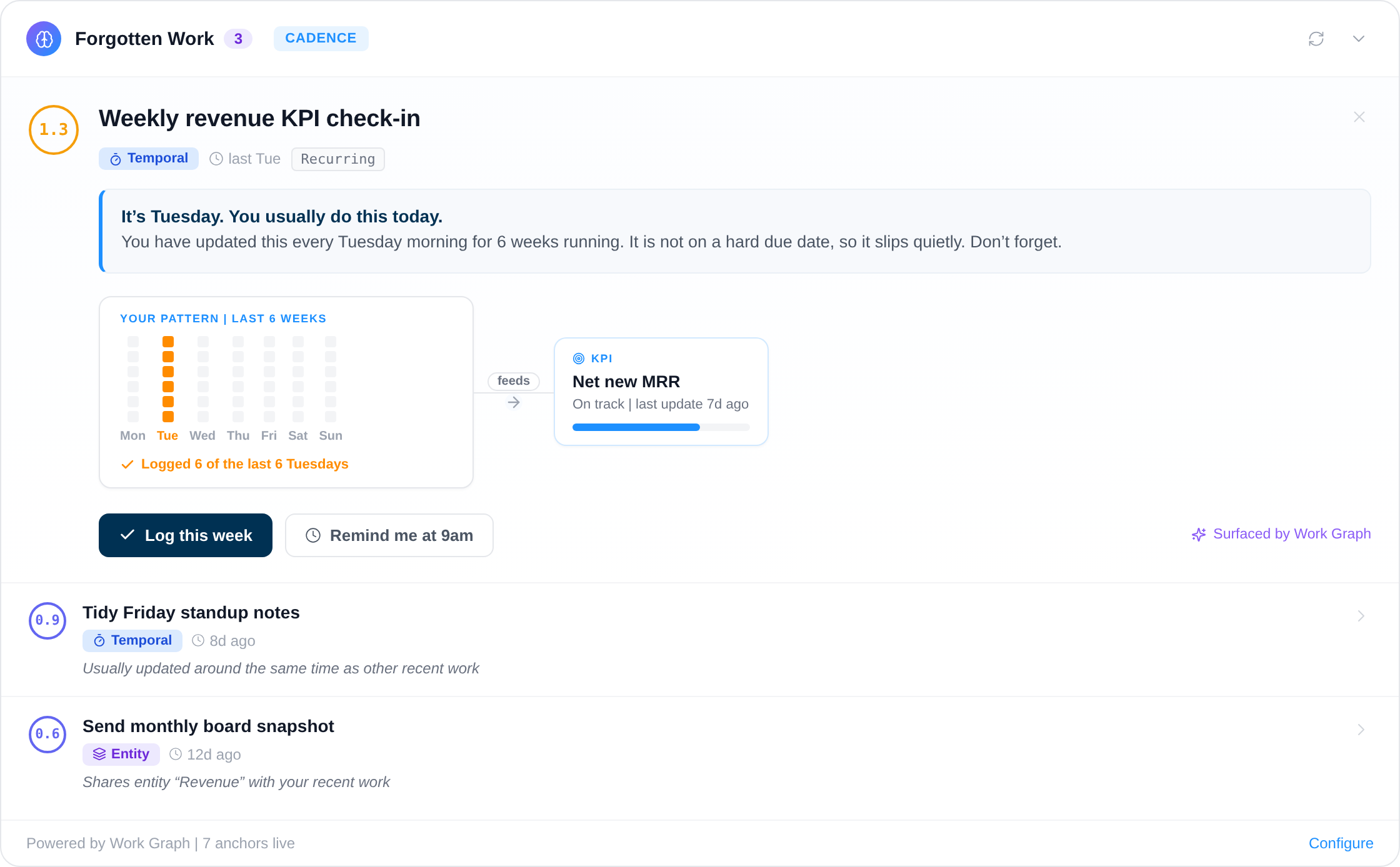
The Work Graph measures pace and focus against expectations continuously and flags the moment a KPI cannot be achieved at the current rate. The review agenda is known weeks in advance, because the misses announced themselves.
Every number is traceable
Each score opens into the projects, tasks and conversations that produced it. When a figure is challenged, the room looks at the work instead of debating whose spreadsheet is newer.
Decisions reach the work
Continue, stop and re-resource decisions propagate along the same edges the data came up on. A deprioritized goal flags its tasks; the teams see the change without a cascade of follow-up meetings.
Build the review view once
Drag-and-drop dashboards, data tables, timeline and alignment views, with week-over-week and quarter-over-quarter comparison built in. The QBR view and the MBR view are saved once and stay current from the work.
- Compare quarter over quarter on the same view, no export.
- Slack messages and task context inline beside the numbers.
Send the pre-read on a schedule
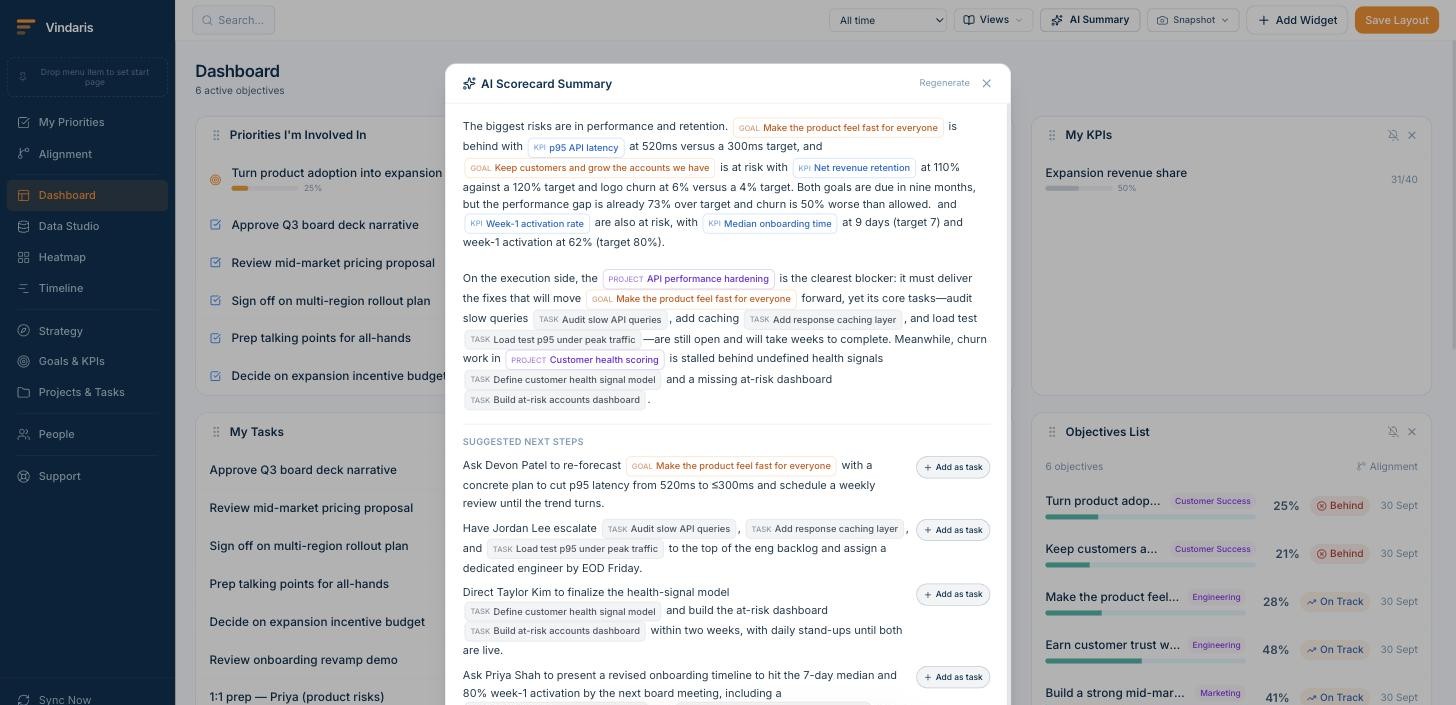
Scheduled AI status reports draft the review narrative from live goal data and deliver it to Slack, Teams or email. The pre-read people actually read, because it is short, current and names the flagged items first.
- Drafted from the work, so owners correct rather than compose.
- Delivered on the review cadence, per team or per leader.
Keep the quarter honest between reviews
Deterministic and AI-driven alerts watch the work behind each goal for stalls, pace falling off and effort drifting elsewhere. The owner hears about it the week it happens, with the specific task named.
- A KPI that cannot be reached at the current pace is flagged early.
- Delivered by email, Slack or Teams on the owner's schedule.
Walk into the portfolio view prepared
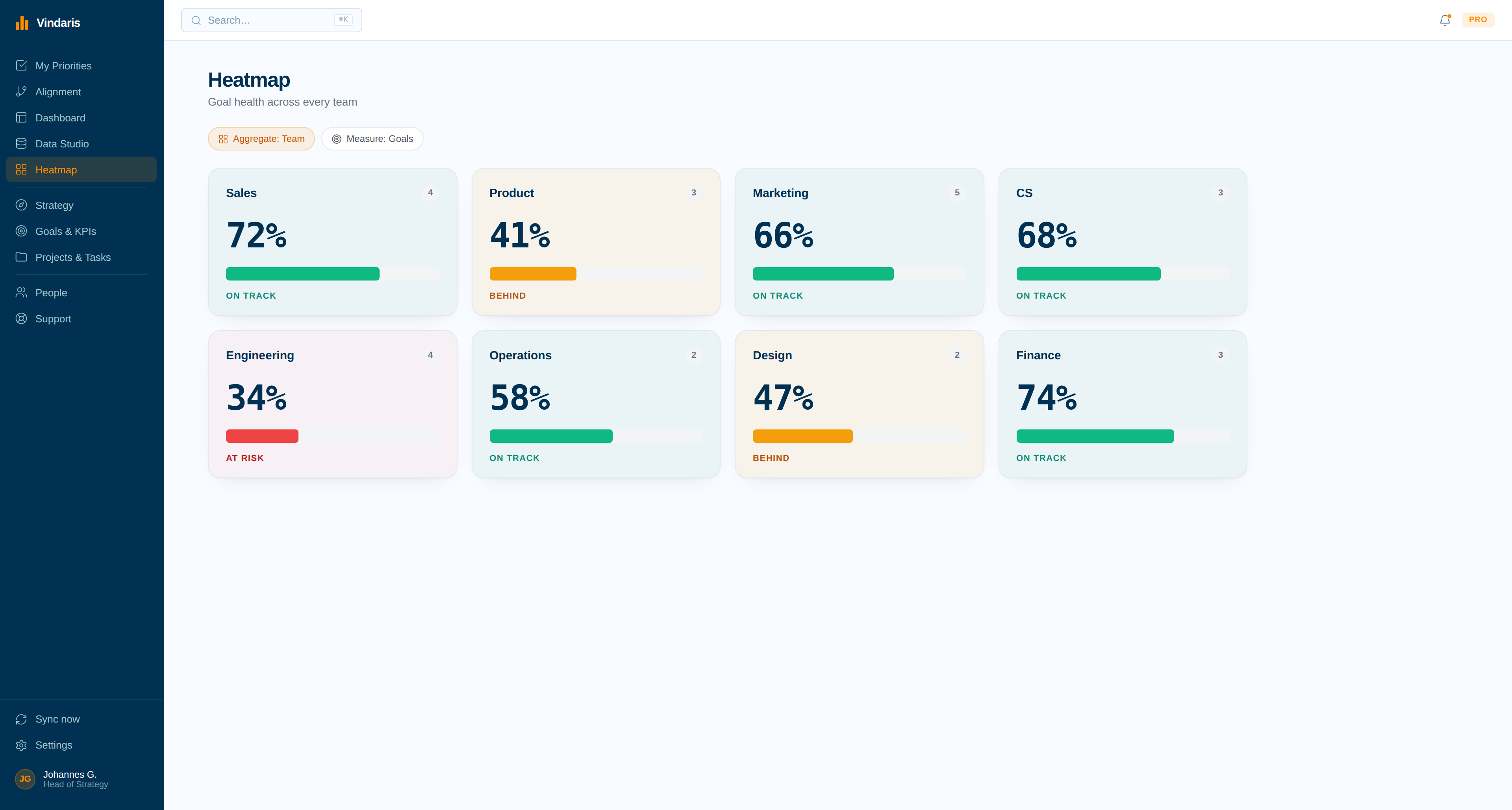
Every team, goal and KPI as a tile shaded against plan. The portfolio question that opens most reviews, where are we really, is answered before anyone speaks.
- Click any tile to reach the work behind it.
- Notified the moment a tile changes colour, not at month end.
One rhythm from weekly signal to quarterly decision.
A review is one beat in an operating cadence: weekly signals, a monthly trajectory check, a quarterly scoring. Vindaris runs the data layer for all of it, whether your reviews follow OKRs, EOS or a custom rhythm. The QBR and MBR definitions and free agenda templates are open if you are building the cadence first.
Start from a proven agenda
The QBR template structures the quarterly meeting around decisions, and the MBR template keeps the monthly check on trajectory. Both are free downloads, and both assume the scores are known before the room.
Build the review around traceable work
The practical guide to running a QBR around traceable work covers the agenda, the pre-read and the decision log, and what changes when nobody has to assemble the data first.
Make the monthly review count
Most MBRs re-litigate the past month. The monthly business review guide reframes it around one question: does the current trend reach the quarterly target, and if not, what moves this week.
Score reviews by decisions, never slides
A review that produced no decision was a status meeting with better attendance. Track continue, stop and re-resource decisions per review, and let the count judge the format. Shorter reviews with more decisions are the pattern Vindaris customers converge on.
Write the list once, never maintain it.
Type the goals you want tracked and who owns them, tag them with @, and the structure appears with the connected work already hanging underneath. Nothing about it needs updating afterwards.
Alerts, so the review is never a surprise.
The worst review outcome is genuine surprise: a miss nobody saw forming. These alerts exist so that by the time the review happens, the room already knows and the meeting can decide.
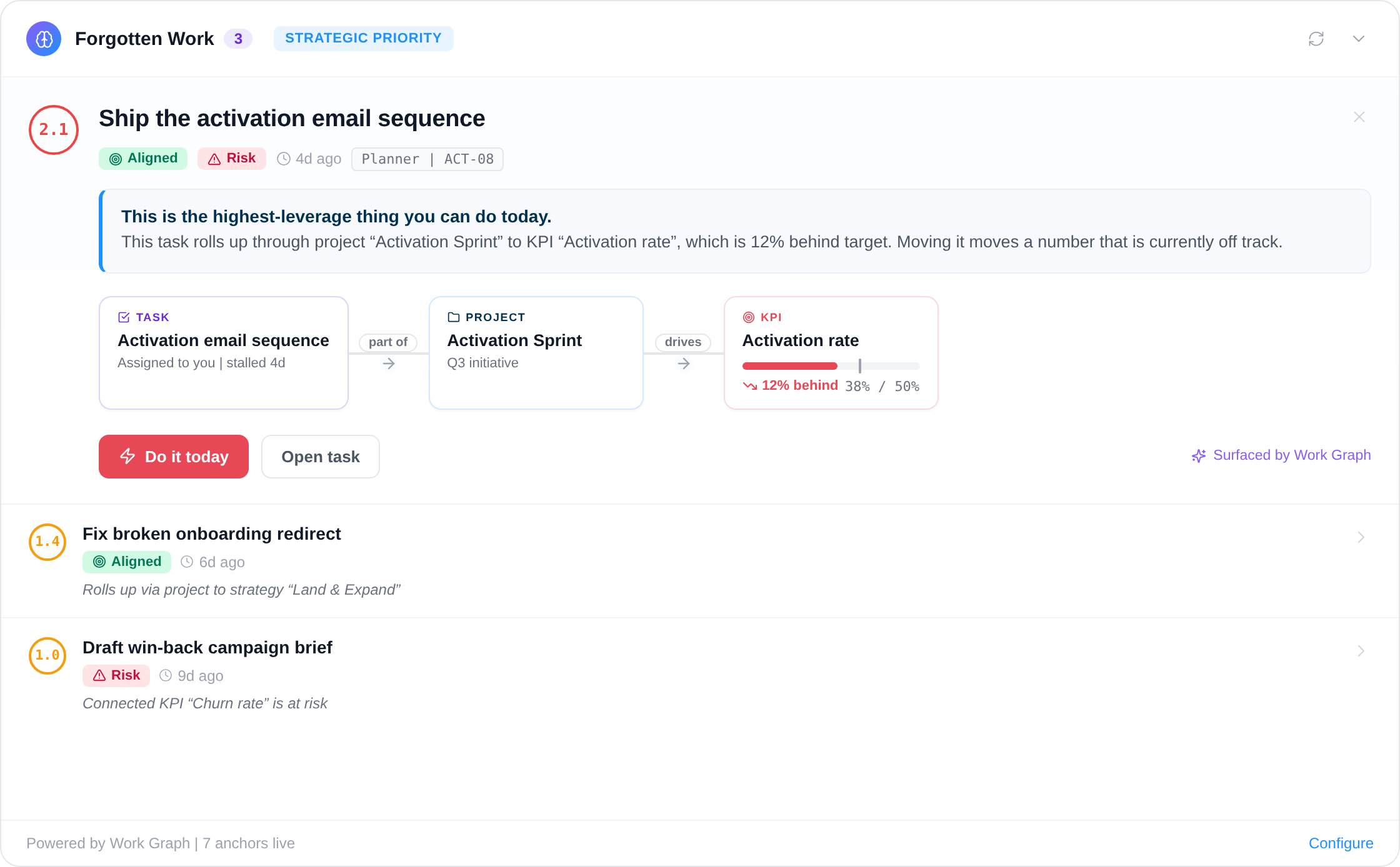
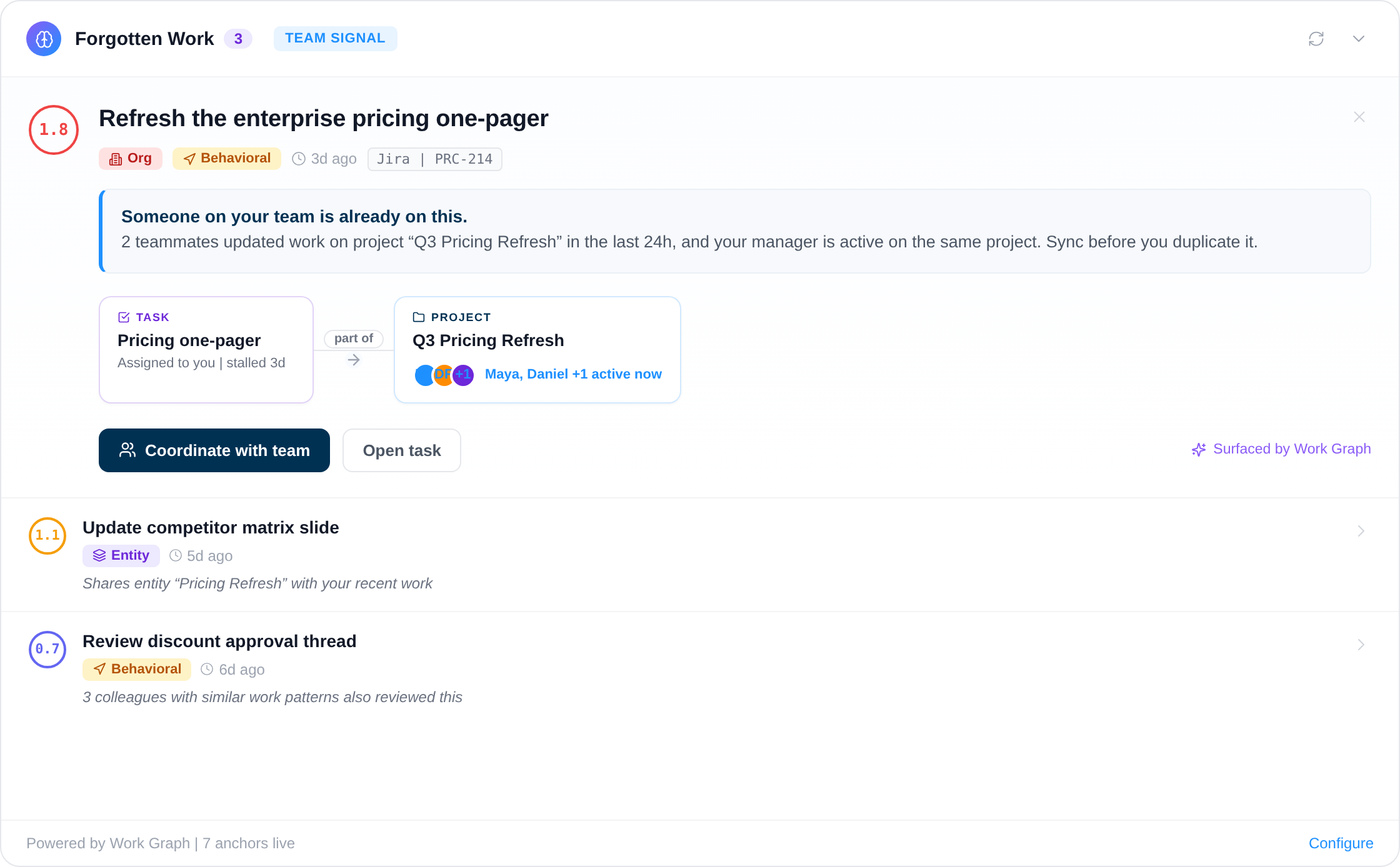
Deterministic and AI-driven alerts watch pace, focus and routine between reviews, so the meeting decides instead of discovers.
Your framework, your language, your data in Europe.
Vindaris fits whichever goal syntax your teams already use, because the tracking problem is the same underneath and switching syntax should not mean switching tools.
Tracks goals in any framework
Vindaris ships without a prescribed methodology, so OKRs, KPIs, SMART goals and EOS Rocks are all tracked the same way in one workspace. Teams keep the format that suits them while leadership keeps a single connected view of progress.
Your data stays in Europe
Vindaris runs in a Hetzner data center in Nuremberg and was built around European data sovereignty from the start. Procurement and your DPO will find the answers they need in the trust center.
Free forever, including two integrations.
Free is a working tracker for a team of five, with two integrations and automatic progress. It is not a fourteen-day window, and there is no card to enter.
Best for individual contributors, small teams or startups. No credit card required.
- All views: Canvas, My Priorities, Heatmap, Data Studio and Task Board
- Two integrations of your choice
- Up to four additional members
- Five ad-hoc AI risk summaries per month
Best for teams, small agencies, or departmental and team management.
- Everything in Free
- All integrations, unlimited sync
- Unlimited AI risk summaries and alignment suggestions
- Up to ten users in one organization
Best for multiple teams, exec teams, Chiefs of Staff or full-org deployments.
- Everything in Connect
- Unlimited users in one organization
- Direct human support, 24h response
- Human-led onboarding
Run a better review before you switch anything.
Real PowerPoint and Excel files and browser tools that run without an account. Most teams fix the agenda first and move the data layer once assembly becomes the bottleneck.
Common questions, answered
What is business review software?
Business review software runs the recurring reviews where leadership checks progress against goals, such as the QBR and the monthly business review. Vindaris connects each goal to the tasks and conversations delivering it, so the review opens on live data and the misses are flagged weeks before the meeting.
What is a QBR meeting?
A QBR (quarterly business review) is the meeting where a team or company scores the quarter against its goals, examines what missed and why, and decides what to continue, stop, or re-resource next quarter. It works best when the scores are known before the room, so the time goes to decisions.
How long should a QBR take?
Ninety minutes for a single team is usually enough when the scores and context are shared beforehand. Reviews run long when the meeting is the first place the data is assembled. With progress derived from the work all quarter, the QBR spends its time on decisions rather than on reading status.
What goes in a monthly business review?
An MBR checks trajectory: whether each KPI's trend, at its current pace, reaches the quarterly target. It surfaces drift early and makes small corrections, so the QBR is never the first time a problem is noticed. Vindaris shows pace against plan continuously, which makes the MBR a short meeting.
Can Vindaris replace the QBR deck?
Largely, yes. Any view can be saved as a report and scheduled into Slack, Teams or email, and AI status summaries draft the narrative from live goal data. Most teams keep a short deck for decisions and drop the status slides, because the status is already on screen and traceable to the work.
How do teams prepare for a business review with Vindaris?
Preparation shrinks to reading. Owners check their flagged goals, the pre-read is a scheduled report drafted from the live data, and the leader walks in knowing which two or three items need a decision. Nobody assembles numbers the night before, because nothing in the review is typed by hand.
Make the next review the shortest one this year.
Map the goals, connect your first tool in 90 seconds, and the QBR data is live from day one. Free forever up to five people.
Run your reviews on live dataNo credit card | No migration | No minimum contract
