Connecting your tools
Connect a tool in one OAuth click, then let it feed tasks, KPI values, document context or conversations into Vindaris.
Good fit if your work already lives in Jira, Asana, Notion, HubSpot or a spreadsheet and you want it flowing into Vindaris instead of being retyped.
Vindaris is most useful when the work it shows is the work you are actually doing, wherever that work is created. Connecting a tool pulls its tasks in and can push changes back, so Vindaris becomes the strategy layer over your existing stack rather than another place to copy things into.
The four kinds of integration
Settings → Integrations groups every connector into four sections by what it feeds. Task integrations pull tasks and issues in and sync status both ways: Slack, Gmail, Jira, Asana, Linear, monday.com, Notion, ClickUp, Microsoft Teams, Google Tasks, Microsoft To Do, HubSpot and Salesforce. KPI integrations feed a live number into a KPI: Excel, Power BI, Salesforce, Notion and HubSpot (see "Tracking a KPI"). Context integrations feed quiet background context: Google Drive folders become document summaries on the goals they are bound to (see "Giving a goal document context from Google Drive"). Conversation integrations pull the threads and comments around a task back in as context (see "Pulling conversations in from your tools").
Connect a tool
- Open Settings → Integrations.Each connector is a card under its section (Task, KPI, Context or Conversation), showing a Connect button, or Sync, Map tasks and Disconnect once it is connected.
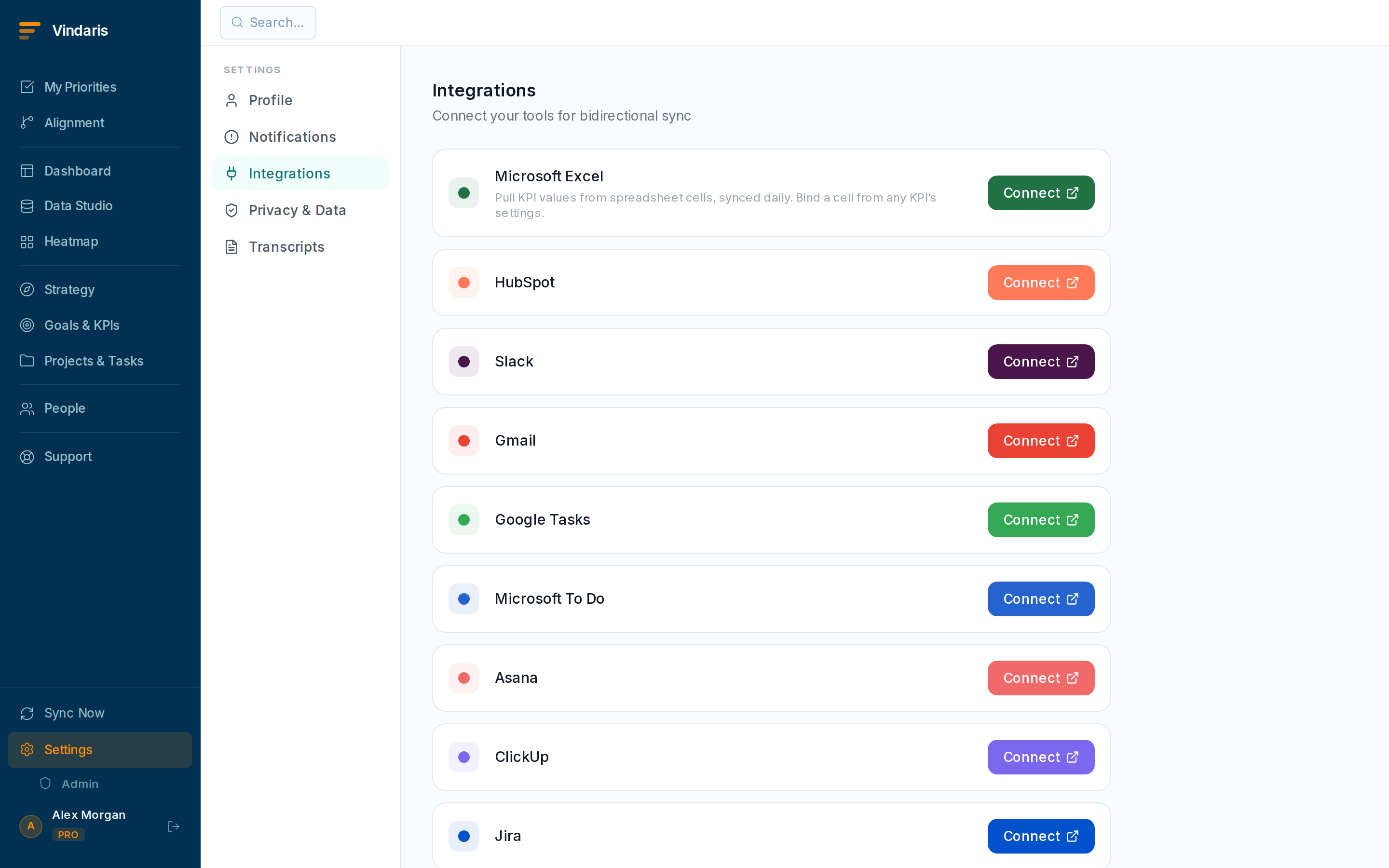
Settings → Integrations: connectors grouped by what they feed. - Click "Connect" on a tool and complete the OAuth approval.You are sent to the provider to authorise Vindaris, then returned with the integration connected. OAuth tools need no API keys to copy.
- On first connect, pick a "Sync window".Choose how far back to import, from all history to the last one to three years, so you are not flooded with ancient closed tasks.
- Use "Map tasks" to align external statuses with Vindaris statuses.A mapping rule decides, for example, that a Jira "In Review" lands in your "In Review" column, and it also governs how Vindaris statuses translate back outbound.
A one-time import is stale the moment someone touches the task in its home tool. A live sync keeps both sides current and lets changes flow back, which is what makes the alignment and dashboards trustworthy: the numbers reflect reality, not a snapshot from the day you onboarded. When the two sides genuinely disagree, the Sync Center asks you to resolve it rather than guessing (see "Resolving a sync conflict").
From a goal, project or strategy you can bind an external container, a Jira project, a Notion database, a monday board or a Salesforce parent record, to that entity. Every task Vindaris syncs under that container then aligns to the entity automatically, so a whole external project rolls up to the right goal without triaging task by task.
Each tool has a single connection for the whole organization. Any member can connect it, and an admin can take it over if the original connector leaves, with the previous holder notified. Reconnecting keeps your sync window and mapping rules in place rather than wiping them.
The Free plan includes two integrations; Connect and Pro include unlimited connections. If you hit the limit you will see an upgrade prompt. See "Managing your plan and billing" for what each tier includes.
When teams reach for this
Vindaris connects to your tools in a few ways: it syncs tasks, pulls KPI values, attaches document context, and brings in the conversations around work. Connect a tool with one OAuth click, and the sync runs both ways so a change in either place stays in step.
Who it helps
Vindaris fits the ops or admin owner who sets up integrations, the team lead whose tasks live in a PM tool, and the RevOps or data person whose numbers live in a CRM or BI tool. It suits scale-ups and mid-market companies, roughly 30 to 500 people and multi-team, whose work is already spread across several specialized tools.
Why it helps
At that size work is scattered across a PM tool, a CRM, a doc store and chat, and retyping any of it into one more system is a tax no one pays for long. Connecting a tool in one OAuth click lets it feed Vindaris directly, so the map stays current from the tools people already use instead of from manual updates.
In practice
- Feed Vindaris from the tools you already use. Connect Jira, Asana, Linear, monday, Notion, HubSpot, Salesforce, Slack or a spreadsheet, and each one feeds the matching kind of data into Vindaris, whether that is tasks, KPI values, documents or conversations. Nobody retypes work that already exists somewhere else.ExampleAn ops lead connects Jira and HubSpot, so engineering tasks and pipeline numbers flow in automatically and the dashboard reflects both without manual entry.
- Keep both systems in step with two-way sync. Connections sync both ways rather than importing once, so a task edited in Vindaris or in the connected tool updates in the other and the two never quietly drift apart. The map stays current without a periodic re-import.ExampleA developer closes a task in Jira and it moves to Done in Vindaris the same sync, so the goal it serves updates without anyone touching Vindaris.
- Bind an external project to the goal it serves. Point a connected tool's project at the Vindaris goal it supports, so the tasks flowing in land under the right goal and roll their progress up automatically. The work maps to the strategy as it arrives, not in a cleanup pass later.ExampleA team binds its Asana Mobile v2 project to the Grow mobile usage goal, so every Asana task lands under that goal and lifts its progress as it ships.
Vindaris maps your strategy, goals and KPIs down to every project and task, and the Work Graph flags execution risk wherever effort has drifted from the goal, with task-level context down to the Slack thread.
Put this into practice
Vindaris keeps strategy, goals, projects and tasks in one place, and the Work Graph flags execution risk before it costs you. Start free, no credit card.
Sign Up for Free