Fine-grained permissions with groups
Build permission groups, set a matrix of resource × scope × ownership, and add members to grant exactly the access intended.
Good fit if role-based access is too blunt, and you need some people to edit goals but only view strategy, or act on their own team's work but not another's.
The Owner/Admin/Member roles cover most teams, but some need a finer cut. Permission groups let an admin grant precise access (which resources, which actions, and whose items) without inventing a new role for every special case.
Permission groups are an admin feature.
- Open Admin → Permissions.Create a group, give it a name and color, then define its permission matrix.
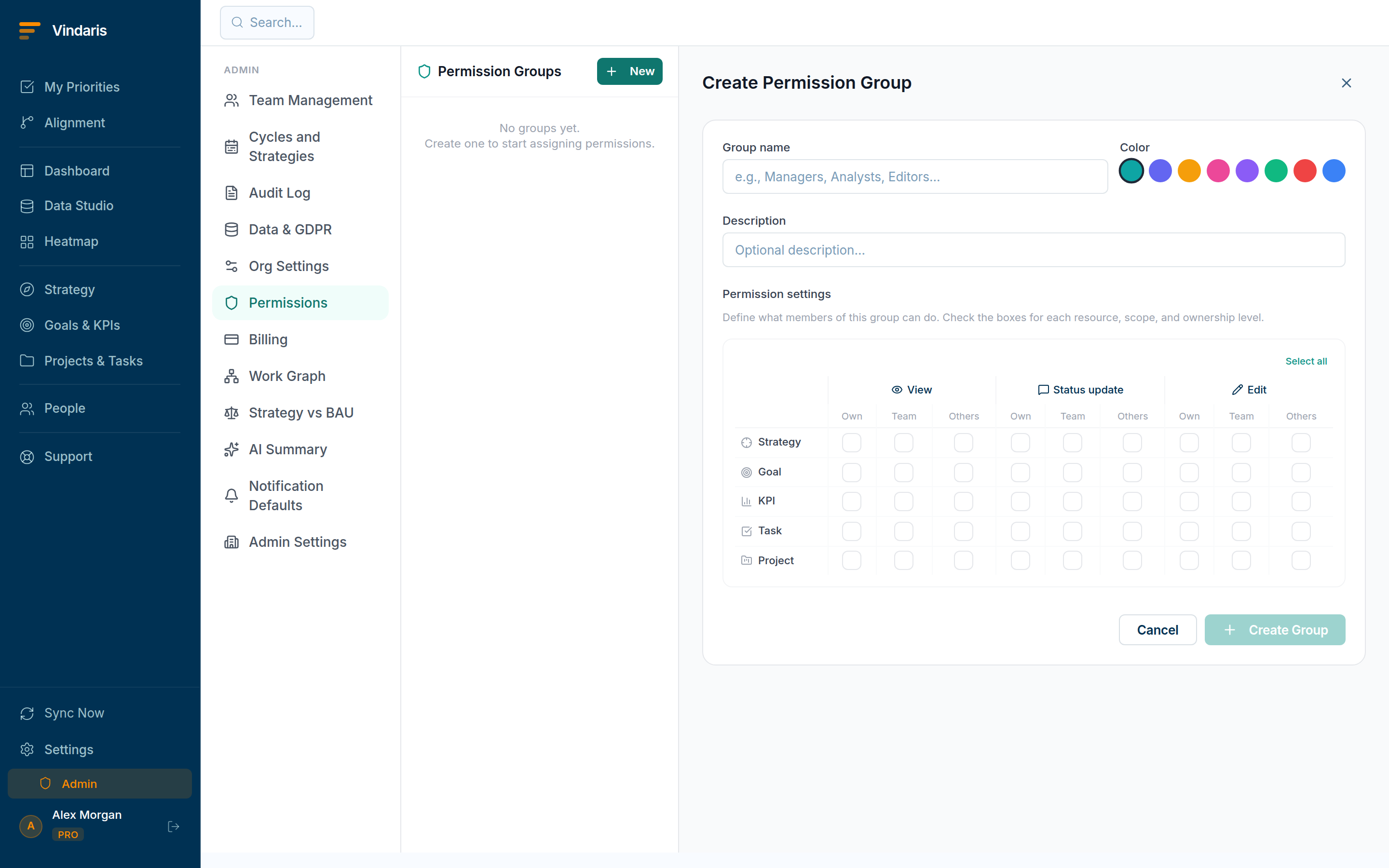
Admin → Permissions: a matrix of resource × scope × ownership. - Set the matrix.For each resource (Strategy, Goal, KPI, Task, Project) choose the scope (View, Status update or Edit) and the ownership level it applies to: their Own items, items Within their team, or items owned By others.
- Add members to the group.Everyone in the group inherits its access. A person can be in more than one group; their effective access is the combination.
Access is rarely "all or nothing": the realistic need is "edit my own and my team's work, but only view what other teams own". Splitting Own / Within-team / By-others lets you express least-privilege precisely: enough reach to do the job, no more. A flat toggle forces you to choose between over-granting and getting in people's way, and over-granting is how strategic data leaks.
Permission groups are the application-layer control. Underneath, Vindaris enforces tenant isolation at the database level too, so cross-organization data is never reachable regardless of how a group is configured.
A permission group also carries a separate MCP matrix that decides what a connected AI assistant may reach on a member's behalf, down to their Own items, items Within their team, or items owned By others. So when someone connects Claude or ChatGPT over MCP, the assistant inherits the same least-privilege limits you set for the person. See "Connecting an AI assistant over MCP".
When teams reach for this
Permission groups are an admin feature that replaces blunt roles with a matrix of resource by scope by ownership. You build a group, set what it can do, and add members, and the same groups also scope what connected AI assistants can touch.
Who it helps
Vindaris fits the workspace admin, the IT or security owner, and the Chief of Staff who decides who can change what. It suits scale-ups and mid-market companies, roughly 30 to 500 people, where several teams share one workspace and a single editor-or-viewer switch no longer matches how people actually work.
Why it helps
Once more than a few teams share the workspace, blanket roles either over-expose strategy or block people from their own work. Permission groups set access as a matrix of resource, scope and ownership, so each group grants exactly what a person needs and nothing wider.
In practice
- Grant exactly the access a team needs. Set a group's matrix so it can edit its own goals but only view the strategy above them, then add the team to it. Access is defined once on the group rather than person by person.ExampleThe marketing team gets a group that edits marketing goals and views company strategy but cannot touch finance's KPIs, applied to all eight members at once.
- Separate acting on your own work from everyone's. Three ownership levels, rather than a simple on or off, let a group act on its own items, its team's items, or all items, so a team lead can manage their team's tasks without reaching across the org. The scope is explicit, so no one quietly inherits more than intended.ExampleA team lead's group can reassign tasks owned by their team but only view tasks in other teams, so a cross-team project stays coordinated without over-reach.
- Scope your AI assistants the same way. The same permission groups bound a connected AI assistant, so an MCP client acts within exactly the access its user has and no more. Access stays consistent whether a person or their assistant is doing the work.ExampleA PM connects Claude over MCP, and it can create tasks under the PM's own goals but cannot edit another team's strategy, because it inherits the PM's group.
Vindaris maps your strategy, goals and KPIs down to every project and task, and the Work Graph flags execution risk wherever effort has drifted from the goal, with task-level context down to the Slack thread.
Put this into practice
Vindaris keeps strategy, goals, projects and tasks in one place, and the Work Graph flags execution risk before it costs you. Start free, no credit card.
Sign Up for Free