Monday morning: what's on my plate
Use My Priorities to triage your week the moment you sit down: no scrolling, no guessing.
Good fit if you open the week to a pile of tasks across several tools and want the one thing to do first, in under two minutes.
My Priorities is your personal cockpit. It shows only the tasks assigned to you, already ordered by urgency and due date, so the answer to "what should I do first?" is the thing at the top.
The two-minute Monday routine
- Open My Priorities from the sidebar.
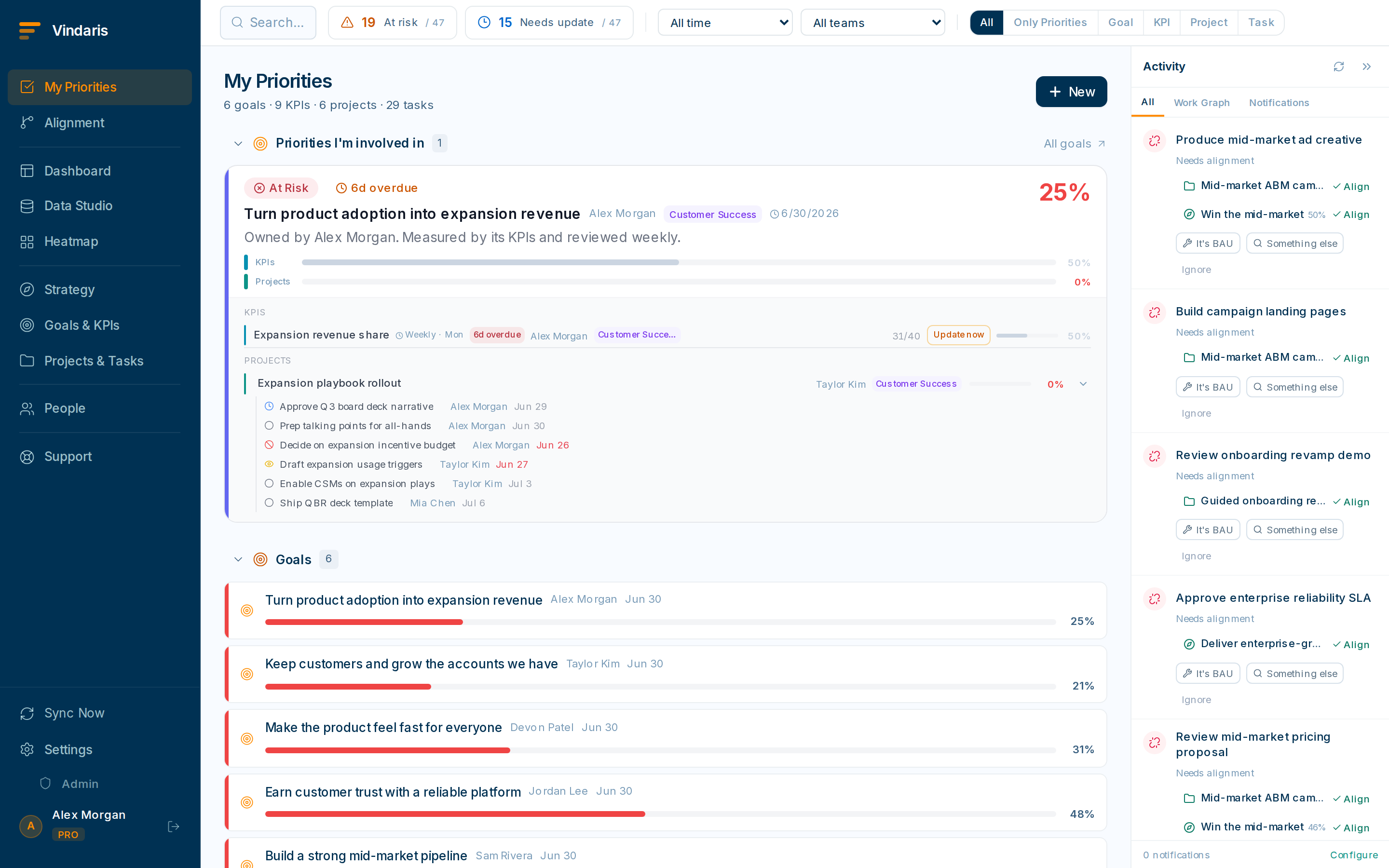
Everything assigned to you, urgent items first. - Scan the top group: overdue and due-today.These are flagged and float to the top. Decide for each: do it, delegate it, or reschedule it.
- Switch to "Only priorities" mode to strip away noise.This hides the long tail and shows just the high-signal items: your priority tasks plus the KPIs and projects that need you.
- For anything you can't place, open the task to see the goal it's linked to.Seeing the strategic "why" usually makes the priority call obvious.
My Priorities ranks by a blend of due date, priority level and recent activity rather than the order you happened to create tasks in. The intent is that the correct first action is literally the first row. So the view does the triage, not you.
New thing landed in your head over the weekend? Add it as a task right from My Priorities and assign it to yourself. If it serves a known goal, link it now. Future-you will thank you when it rolls up automatically.
When teams reach for this
My Priorities is your personal view of only the tasks assigned to you, ordered by a blend of due date, priority and recent activity, so the first row is the right first action. It gathers work from the tools you have connected, so you triage one list instead of five inboxes.
Who it helps
Vindaris fits anyone with a full plate and competing priorities: the individual contributor who juggles work across several projects, the team lead who also carries their own tasks, and the manager who wants a two-minute start to the week. It helps most in scale-ups and mid-market companies, roughly 30 to 500 people, where each person's work is spread across several tools and teams.
Why it helps
As a company grows, each person's tasks scatter across a PM tool, a chat app and an inbox, so Monday starts with ten minutes of scrolling to work out what matters. My Priorities collects your assigned work into one ranked list and floats overdue and due-today to the top, so the triage is done before you open it and you start on the right thing.
In practice
- Triage the week in two minutes. My Priorities shows only your tasks, already ordered by urgency and due date, so you scan the top group of overdue and due-today items and decide for each one whether to do it, delegate it or reschedule it. The view does the ranking, so you spend the time deciding.ExampleA product manager opens Monday to 30 tasks across three projects. The overdue group has two items, so she reschedules one and does the other, and the week is planned in the first two minutes.
- Strip the view down to what needs you. Switch to "Only priorities" mode and the long tail drops away, leaving your priority tasks plus the KPIs and projects that need a decision from you. It is the same list with the noise removed, for the days when everything feels urgent.ExampleOn a heavy week a team lead flips to Only priorities and goes from 40 rows to 6, then works straight down the list.
- Catch stray work before it falls through. Add a task to yourself straight from My Priorities the moment it lands, and link it to the goal it serves, so it rolls up automatically and shows up in next Monday's triage. Nothing has to live only in your head or on a sticky note.ExampleA thought from a weekend call becomes a task linked to the retention goal, so it appears in the ranked list on Monday and counts toward the goal it supports.
Vindaris maps your strategy, goals and KPIs down to every project and task, and the Work Graph flags execution risk wherever effort has drifted from the goal, with task-level context down to the Slack thread.
Put this into practice
Vindaris keeps strategy, goals, projects and tasks in one place, and the Work Graph flags execution risk before it costs you. Start free, no credit card.
Sign Up for Free