Prepping for a meeting in five minutes
Pull a clean, current picture of the relevant goals, tasks and risks right before you walk in.
Good fit if you have a 1:1 or team sync soon and want to walk in knowing exactly where things stand.
The goal of meeting prep is to walk in with the current truth, not a half-remembered version of last week. Vindaris already holds that truth. You just need to pull the right slice.
For a 1:1 with a report or peer
- Open People and click the person you're meeting.Their profile shows current goals, active tasks and recent check-ins in one place.
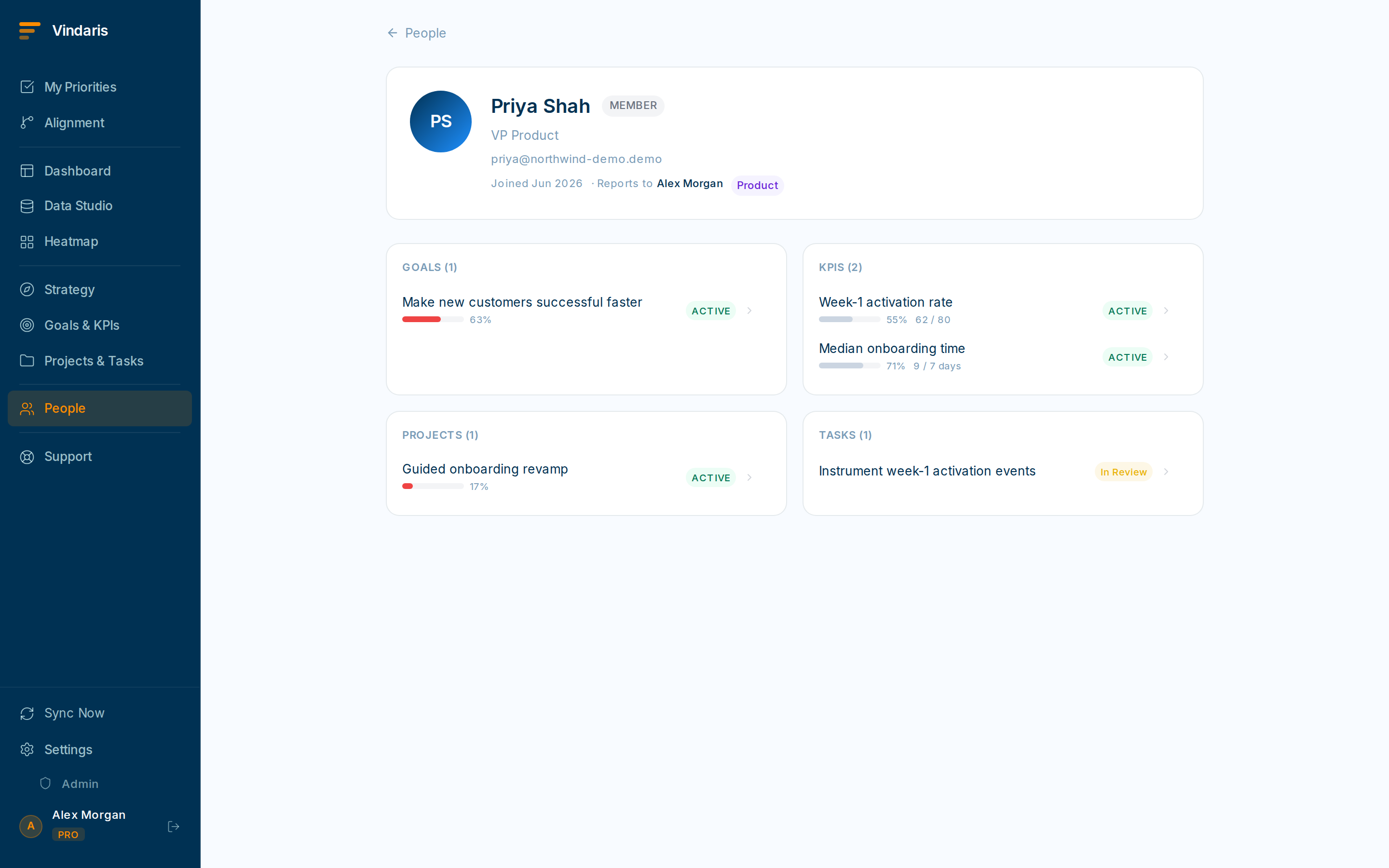
One person, their goals, tasks and latest check-ins. - Skim their recent check-ins for what changed since you last spoke.This shows wins and blockers without you having to ask "so, any updates?".
- Note any goal that's turned yellow or red.A health color change is the most useful thing to talk about: bring it as a question, not an accusation.
For a team or project sync
- Open the relevant Project board and filter to "updated this week".You instantly see what moved, what's stuck in review, and what's newly blocked.
- Glance at the Dashboard for the team or goal to catch the at-risk items.Bring the reds to the meeting; let the greens speak for themselves.
- If your plan includes the AI briefing, read it for a one-paragraph narrative of risk and priorities.It's a fast way to frame the conversation. See "Reading the dashboard" for where it appears.
If you prep the same slice every week, build it once in Data Studio and Save the view. Next week it's one click. See "A data studio view for a team meeting".
When teams reach for this
Prepping is a matter of opening the right view: for a 1:1, the other person's goals, active tasks and recent activity; for a team sync, the project's open work and anything slipping. The view is current because it draws on the live map, so there is nothing to assemble.
Who it helps
Vindaris fits the manager heading into a 1:1, the team lead running a sync, and the individual preparing to be asked about their work. It helps most in scale-ups and mid-market companies, roughly 30 to 500 people, where the answer to 'where are we?' is spread across several people and tools.
Why it helps
At that size walking into a meeting cold means ten minutes of catching up on who did what, so the conversation starts late and shallow. A current picture of the relevant goals, tasks and risks pulled right before the meeting means you open on decisions, not status.
In practice
- Walk into a 1:1 already current on their work. Open a report or peer's view to see their goals, active tasks and recent activity, so you arrive knowing what moved and what stalled since last time. The catch-up happens before the meeting, not during it.ExampleA manager opens a report's view two minutes before their 1:1, sees a task blocked for a week, and leads with unblocking it rather than asking for an update.
- Run a team sync off one current view. A project or team view shows the open work, what is due and what is slipping, so the sync follows the real state of play rather than a stale agenda doc. Everyone sees the same picture at once.ExampleA team lead projects the project view in the Monday sync, and the two slipping tasks set the agenda on their own.
- Save the view you always open. Once a view works for a recurring meeting, save it so getting back to it is one click every time. The prep gets faster each week because the view is already built.ExampleA Chief of Staff saves a 'Weekly leadership sync' view, and prep for the standing meeting drops to opening one link.
Vindaris maps your strategy, goals and KPIs down to every project and task, and the Work Graph flags execution risk wherever effort has drifted from the goal, with task-level context down to the Slack thread.
Put this into practice
Vindaris keeps strategy, goals, projects and tasks in one place, and the Work Graph flags execution risk before it costs you. Start free, no credit card.
Sign Up for Free