Managing your notifications
Set global channel defaults, override per notification type across Activity pane, Email and Push, and turn on browser push.
Good fit if you are getting too much of one kind of notification and not enough of another, and want to fix it per channel.
Notifications are only useful if they are tuned: too many and you stop reading them, too few and you miss what matters. Vindaris gives you a grid: every notification type crossed with three channels, so you decide exactly what reaches you where.
- Open Settings → Notifications.Set "Global defaults" first: the channels (Activity pane, Email, Push) you want on by default.
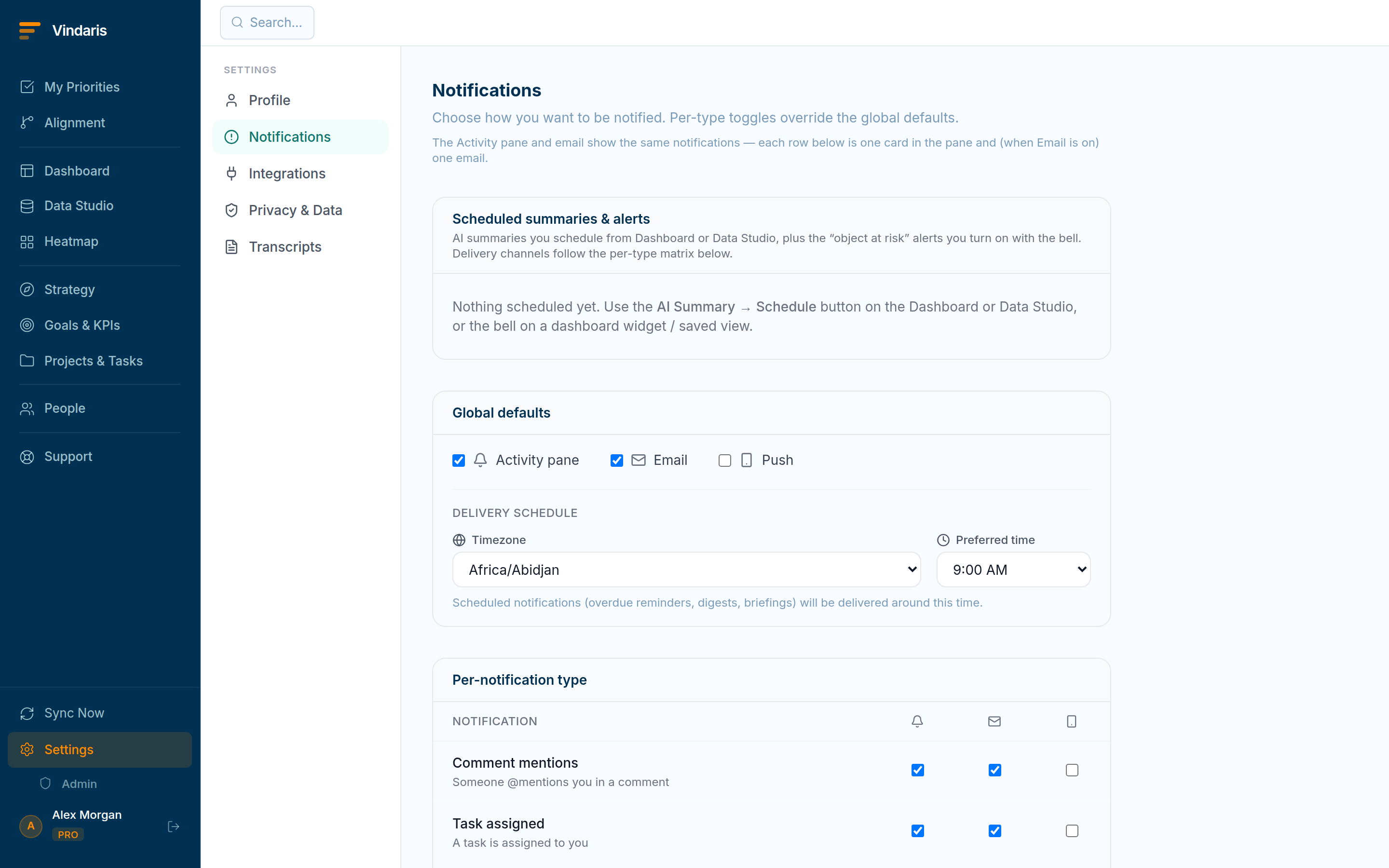
Per-type, per-channel control over every notification. - Override per type in the table below.Each row is a notification type (task assigned, goal at risk, sync failed, AI summary and more) with a checkbox per channel. Overrides are highlighted so you can see what you have customized.
- Set your timezone and preferred time under "Delivery schedule".Scheduled items (digests, reminders, briefings) arrive around that local time.
- Enable browser Push from the push toggle.Your browser asks permission once; after that, Push-routed notifications reach you even when the tab is closed.
They are different urgencies. The Activity pane is the ambient feed you scan; Email is the durable record you can search; Push is the interrupt that reaches your phone. Mapping each notification type to the right channel (risk alerts to Push, routine updates to the pane only) is what keeps the signal high without muting things you actually need.
Admins can configure organization-wide notification defaults, and can lock them. If you see "Locked by admin", your preferences are managed centrally. Contact your administrator to change them.
When teams reach for this
Notifications run across three channels, the Activity pane, Email and Push, and you set a global default per channel then override it per notification type. Turning on browser push adds the channel, so each kind of update reaches you where you want it.
Who it helps
Vindaris fits every user tuning their own alerts, and the admin who sets sensible defaults for the org. It suits scale-ups and mid-market companies, roughly 30 to 500 people, where notification volume can either overwhelm people or let important changes slip past.
Why it helps
At that size default notifications are either too loud, so people mute everything, or too quiet, so changes go unseen. Per-channel, per-type controls let each person keep the alerts that matter and silence the rest, so notifications stay useful.
In practice
- Keep the alerts that matter, silence the rest. Setting a default per channel and overriding it per type means you can get risk changes by email while mentions stay in the Activity pane. The volume matches what you act on, so you stop tuning everything out.ExampleA lead routes risk alerts to email and keeps routine mentions in-app, so the inbox carries only what needs a response.
- Split the channels on purpose. Because the Activity pane, Email and Push are controlled separately, you can put urgent changes where you will see them fast and quieter updates where they can wait. Each channel carries the kind of message it suits.ExampleAn IC turns on push for direct assignments only, so the phone buzzes for real asks and nothing else.
- Start from the admin's defaults. Admins can set org-wide defaults, so people begin with a sensible baseline and adjust from there rather than configuring from scratch. The defaults keep the whole org from either noise or silence on day one.ExampleAn admin sets risk alerts on by default, so every lead starts already warned about slipping goals and can fine-tune later.
Vindaris maps your strategy, goals and KPIs down to every project and task, and the Work Graph flags execution risk wherever effort has drifted from the goal, with task-level context down to the Slack thread.
Put this into practice
Vindaris keeps strategy, goals, projects and tasks in one place, and the Work Graph flags execution risk before it costs you. Start free, no credit card.
Sign Up for Free