Tracking a KPI
Create a KPI, set start/current/target, choose how it is measured, and keep it current with check-ins.
Good fit if you own a KPI tied to a goal and need a number that holds up when someone asks how you know.
A goal tells you the direction; a KPI tells you whether you are getting there. KPIs are the live numbers Vindaris rolls up into dashboards, the heatmap and your AI briefings. So a goal with at least one KPI is a goal you can actually defend in a review.
Create a KPI
- Open Goals & KPIs from the sidebar, click "+ New" below the menu bar and choose KPI.You can also add a KPI from inside a goal, which auto-links it to that goal.
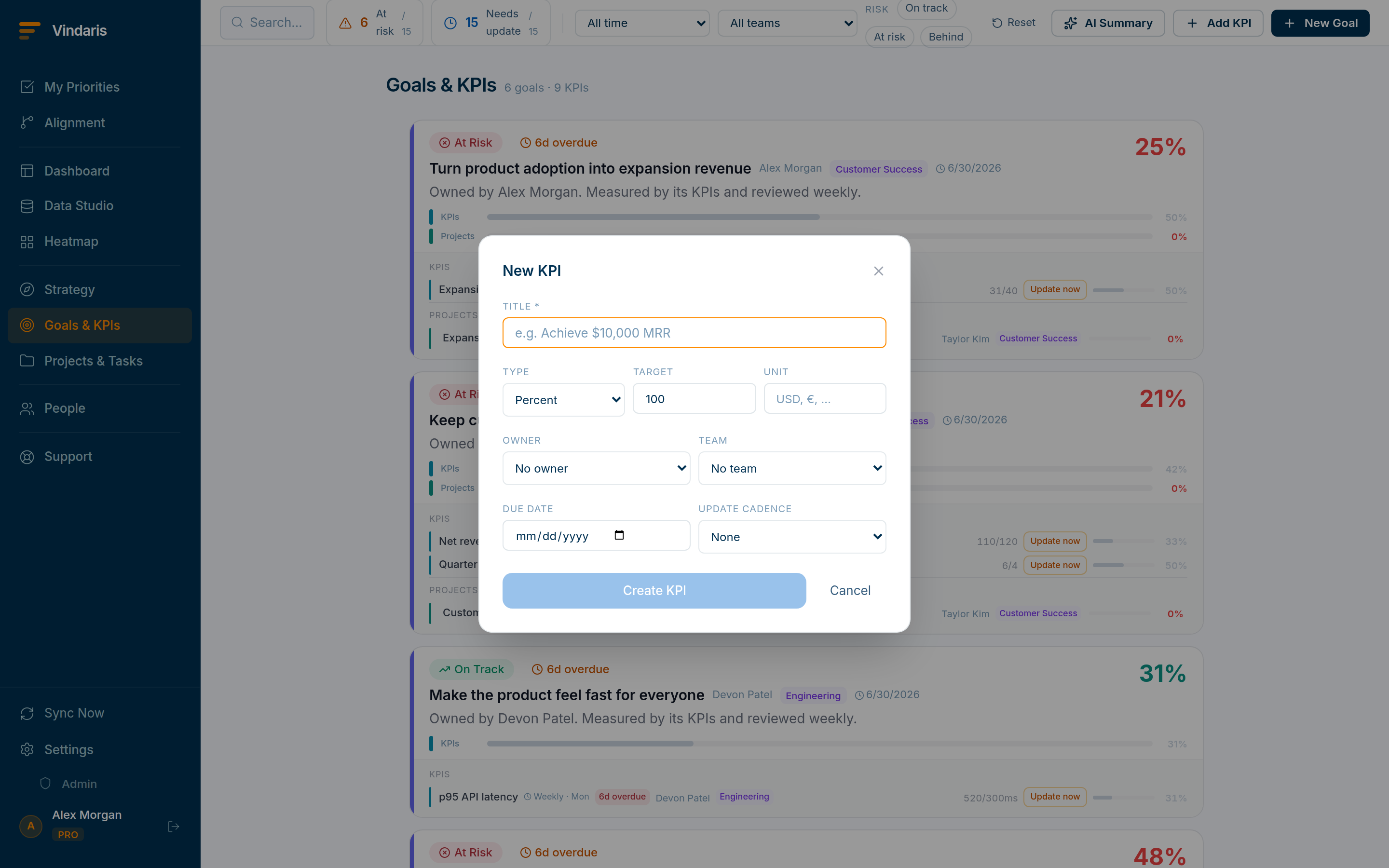
Add KPI: a title and the three values that define progress. - Give it a title and pick a Type: Percent, Number, Currency or Yes/No.Currency adds a symbol picker ($, €, £, Fr). Yes/No is a one-shot "done / not done". Percent is the default and the most common.
- Set Start, Now and Target.Progress is computed from how far "Now" has traveled from Start toward Target. So a KPI that starts at 40 and targets 90 shows 0% at 40 and 100% at 90.
- Open "More options" to set an Owner, an update cadence, and dates.Cadence (Daily / Weekly / Monthly) is what makes Vindaris nudge the owner when a number goes stale. See "Keeping a KPI current".
A slider records an opinion; a KPI records a measurement. "We are 70% done" means nothing six weeks later. "Revenue is at €420k against a €600k target" is checkable, comparable across quarters, and survives the question every QBR eventually asks: how do we know? That is why every dashboard widget and the heatmap draw on KPI values, not slider positions.
Roll-up KPIs
Set a KPI's Mode to Rollup (under "More options") and it stops taking a manual value. It then aggregates from the child KPIs aligned beneath it, using Sum or Average. Use this for a top-line metric that is really the total of several team-level numbers, so updating the children keeps the parent value accurate automatically.
For numbers that already live elsewhere, open a KPI and link it to a source: an Excel cell, a Power BI measure, a Salesforce SOQL aggregate, a Notion page property, or a count, sum or average over a HubSpot object. Connect the account first in Settings → Integrations, then bind the KPI to the exact cell, measure, query or property. Vindaris pulls the value once a day, so the KPI stays current without anyone retyping it. Roll-up KPIs cannot be linked, because they are computed from their children.
When teams reach for this
A KPI is a live number with a start, a current and a target value, and Vindaris computes progress from how far the current value has moved toward the target. KPIs roll up into the dashboards, the heatmap and the AI briefings, and can pull their value straight from a source such as Excel, Power BI, Salesforce, HubSpot or Notion once a day.
Who it helps
Vindaris fits the PM, director or PMO lead who owns a KPI tied to strategy, the RevOps or data-ops person who keeps the numbers current, and the executive who reads them in the review. It suits scale-ups and mid-market companies, roughly 30 to 500 people, where KPIs live across several tools and have to be pulled together for one defensible picture.
Why it helps
At that size the metrics that matter are spread across a spreadsheet, a BI dashboard and a CRM, so keeping them current by hand is a standing chore and the review still opens with "is this number right?". Vindaris binds each KPI to its live source and pulls the value once a day, so the number is current without retyping and comes with the dated trail that answers how you know.
In practice
- Keep a KPI current from the source it already lives in. Link a KPI to an Excel cell, a Power BI measure, a Salesforce query, a HubSpot object count or a Notion property, and Vindaris pulls the value once a day, so the dashboard and the briefing stay current with no one retyping. Connect the account in Settings, then bind the KPI to the exact cell, measure or query.ExampleA RevOps lead binds "MRR" to a Salesforce SOQL aggregate, so the board KPI updates every morning and the Monday review opens on the current number.
- Roll several team numbers into one top-line metric. Set a KPI's mode to roll-up and it stops taking a manual value and aggregates from the child KPIs beneath it with sum or average, so updating the team numbers keeps the company number accurate on its own. Use it for a metric that is really the total of several teams' results.ExampleCompany "new logos" is a roll-up over four regional KPIs. When APAC closes three deals, the company number moves without anyone editing it.
- Make the number defensible in a review. Because a KPI records a measured value against a target rather than an opinion, "how do we know?" has an answer in the data, and check-ins add a dated note on why a number moved. Every dashboard widget and the heatmap draw on the KPI value, so the live board and the review agree.ExampleIn a QBR, "NPS at 41 against a 50 target" points to the check-in history that moved it, so the metric holds up when a board member probes it.
Vindaris maps your strategy, goals and KPIs down to every project and task, and the Work Graph flags execution risk wherever effort has drifted from the goal, with task-level context down to the Slack thread.
Put this into practice
Vindaris keeps strategy, goals, projects and tasks in one place, and the Work Graph flags execution risk before it costs you. Start free, no credit card.
Sign Up for Free