 Asana
Asana
Asana tasks, weighed against the goals they were supposed to deliver.
Vindaris syncs a project you choose, or every task assigned to you across a workspace, and keeps section, due date, custom field, and comment data attached. Your team never leaves Asana. Leadership stops asking them for status.
Free forever | Two integrations included | Your team keeps working in Asana
Sections, custom fields, and the comment thread, not just a checkbox.
An Asana task carries most of its meaning in the things around the checkbox: which section it sits in, what the priority field says, and what people wrote on it last week. Vindaris keeps all of that so the Work Graph has something to reason about.
Connect a single project when one initiative matters, or sync every task assigned to you across the workspace when the goal spans several projects.
Vindaris reads the section a task sits in, so a board where Doing and Blocked are columns still produces a meaningful status without asking anyone to relabel work.
Custom field values come across with the task, which is how priority, team, or workstream survive the trip and stay usable for mapping work to goals.
Human comments sync into Vindaris as context, and updates written in Vindaris are pushed back as Asana stories, so the discussion stays in one place.
Complete it in Asana and the goal updates. Complete it in Vindaris and the Asana task closes. Nobody maintains two lists.
Vindaris appends a short line to the task notes naming the goal the task serves, so people working in Asana can see why the task exists.
Authorize, choose the scope, confirm what maps where.
Setup is a single OAuth grant and one scoping decision. There is no migration and no template to install in Asana.
Grant access from the integrations screen. Tokens are stored encrypted and refreshed automatically, so the connection does not quietly expire.
Choose one project to track an initiative, or a workspace to follow everything assigned to you. Both can run side by side on different goals.
Vindaris proposes which tasks serve which goal based on project, section, and owner. You approve, adjust, or leave work unmapped on purpose.
Progress rolls up from task completion, and the Work Graph flags a goal whose tasks have gone quiet against what the target needs.
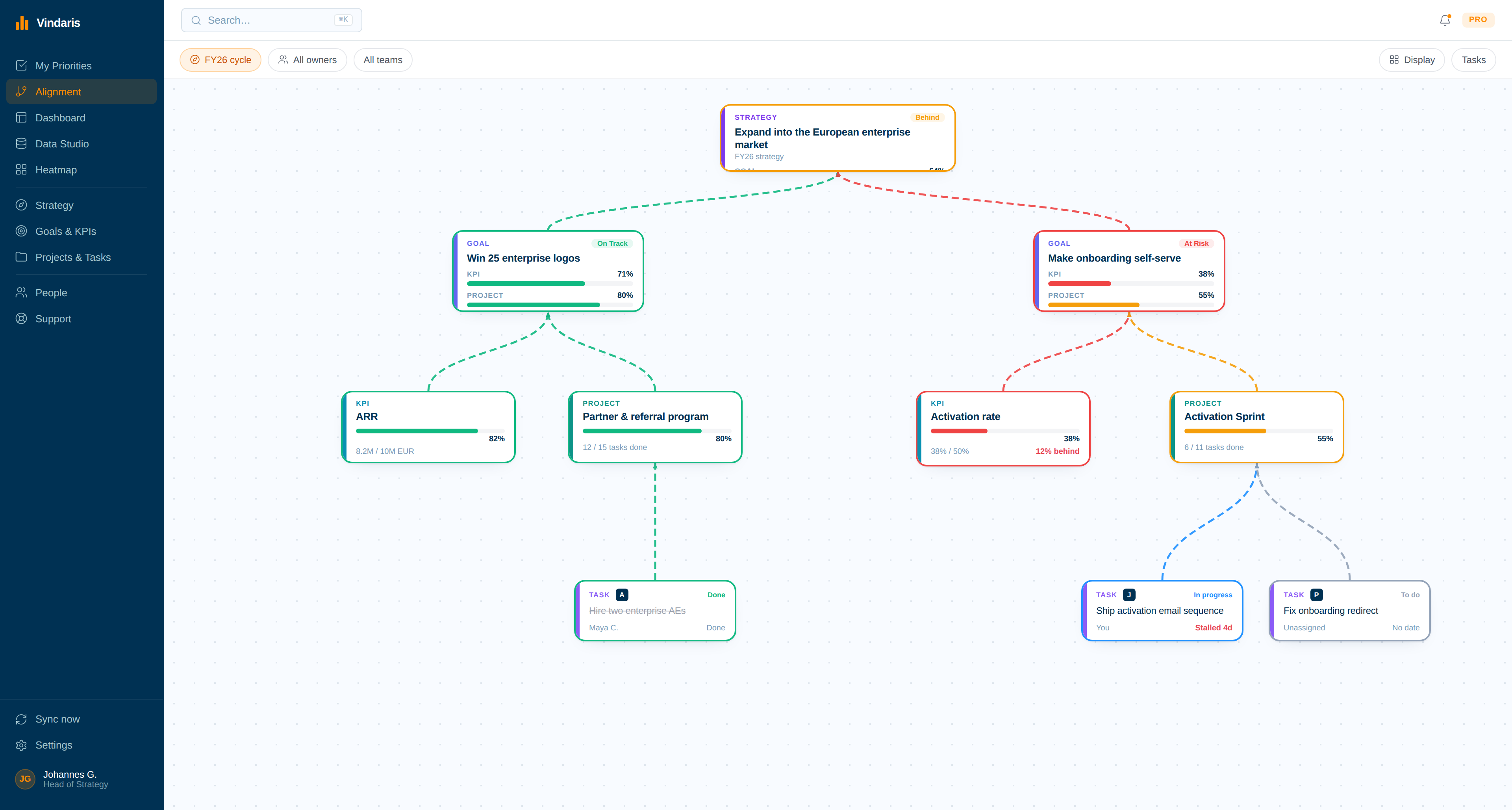
Asana projects sitting under the strategy they serve.
Map the objective, then see the Asana work hanging off it. Goals with no tasks underneath and projects with no goal above them both become obvious in one view.
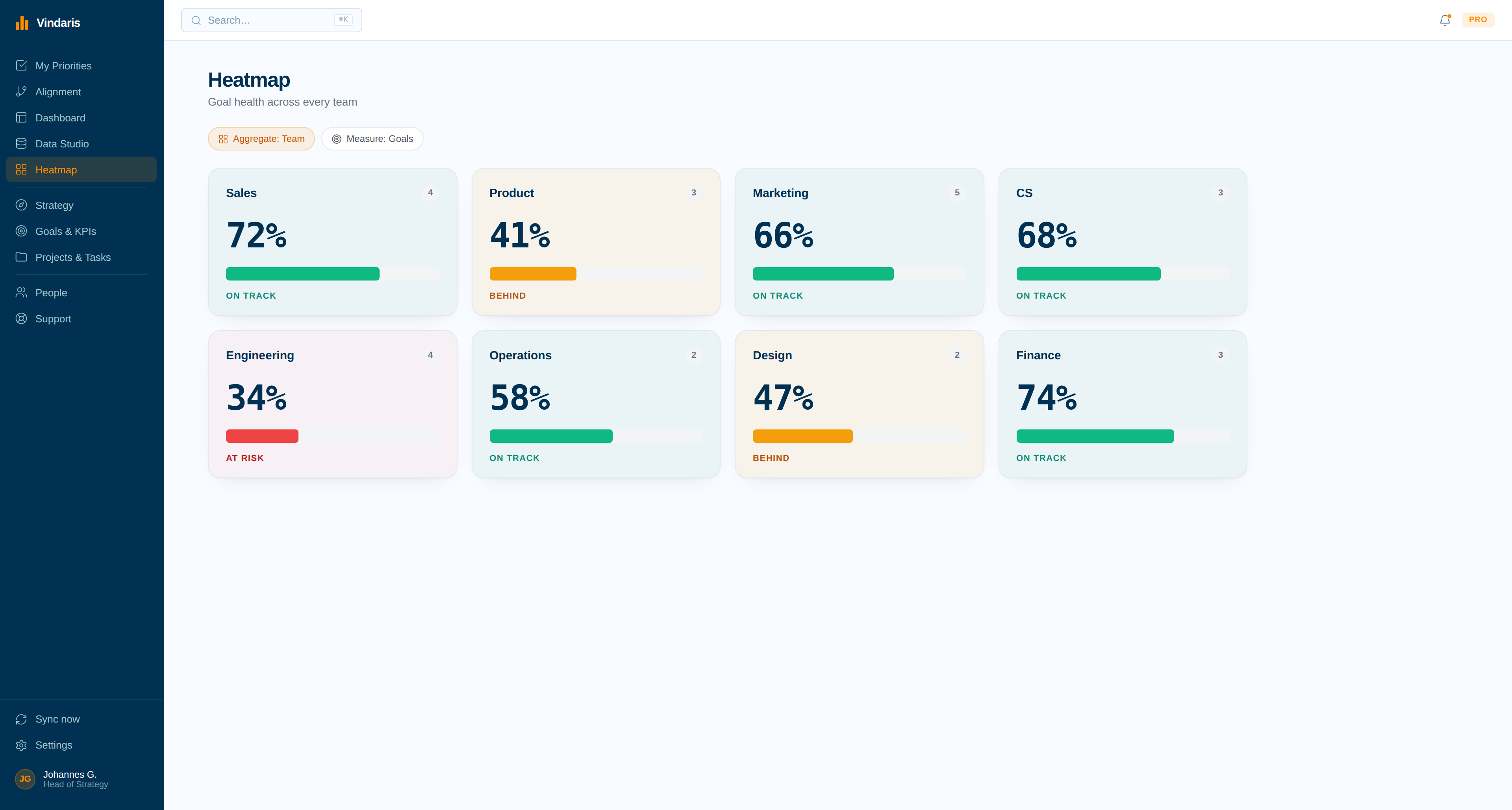
Which team's Asana work has drifted off the plan.
The heatmap compares effort against the goals each team owns, so a squad spending the quarter on unmapped project work shows up as a pattern rather than a rumour.
Asana tells you the project is 80 percent done. It cannot tell you whether that matters.
Asana is very good at running a project to completion. What it does not hold is the reason the project exists, which means a team can close every task on schedule and still move the company metric by nothing. The mismatch usually surfaces at a quarterly review, in the form of a green project board next to a red KPI.
Vindaris sits above that. Each Asana task connects to the goal or KPI it feeds, and progress is derived from the tasks that actually moved rather than from a completion percentage someone reports. When a goal's Asana work stalls or when a team's effort quietly shifts onto projects mapped to nothing, the Work Graph says so while there is still a quarter left to act in.
Where to go next
Asana and Vindaris, answered
Can I sync more than one Asana project?
Yes. Each connection targets one project or a whole workspace, and you can run several connections at once. Teams commonly connect one project per major initiative and a workspace-level connection for everything else assigned to them.
Do Asana custom fields come across?
Yes. Custom field values sync with the task, which is how priority, workstream, or team survive the trip and stay usable when mapping work to goals in Vindaris.
Will Vindaris post into my Asana project?
Only where you ask it to. Comments written in Vindaris are pushed back as Asana stories, and a short watermark naming the linked goal is added to task notes. Nothing else is written into your project.
Does this replace Asana Goals?
It replaces the manual part. Asana Goals holds objectives inside Asana and is updated by people; Vindaris derives progress from the tasks themselves, spans every other tool your company uses, and flags goals whose work has stalled.
Keep your team in Asana. Give leadership the goal view.
Connect Asana in a couple of minutes. Free forever for goal management, two integrations included.
Connect Asana freeNo credit card | No migration | Nobody leaves Asana
