 Google Tasks
The list next to your calendar, counted toward the goal.
Google Tasks is where a lot of commitments actually get written down, usually straight after the meeting that created them. Vindaris syncs a task list two ways and connects those items to the objective they serve.
Free forever | Two integrations included | Your team keeps working in Google Tasks
Small, fast, and closer to the truth than a status field.
Nobody games their Google Tasks list. It gets written in the two minutes after a meeting and it reflects what someone genuinely intends to do, which makes it a good input for pace analysis.
Pick the list to connect. Anything you keep in a separate personal list is never read.
Closing a task in either tool closes it in the other, so the list beside your calendar keeps being the one you trust.
Dates and note text sync across, with a short watermark naming the goal so the item keeps its purpose.
Completion timing is what the Work Graph uses to judge whether a goal is moving fast enough for its target date.
Google Tasks items appear next to work from other tools, ordered by the strategic weight of the goals behind them.
Reverse mappings control what Vindaris writes back, which keeps behaviour predictable when several tools sync into one goal.
Authorize, pick a list, connect it to goals.
Setup takes under a minute and requires nothing from a Google Workspace administrator beyond normal user consent.
Grant access from the integrations screen. Tokens are encrypted at rest and refreshed automatically.
Select which list to sync. Most people connect the default list and leave personal ones out.
Approve the suggested links so completions actually move a goal instead of disappearing into a checklist.
Progress rolls up automatically, and the Work Graph raises the goals whose tasks are not being completed fast enough to hit the date.
The day's list, ordered by what the quarter needs.
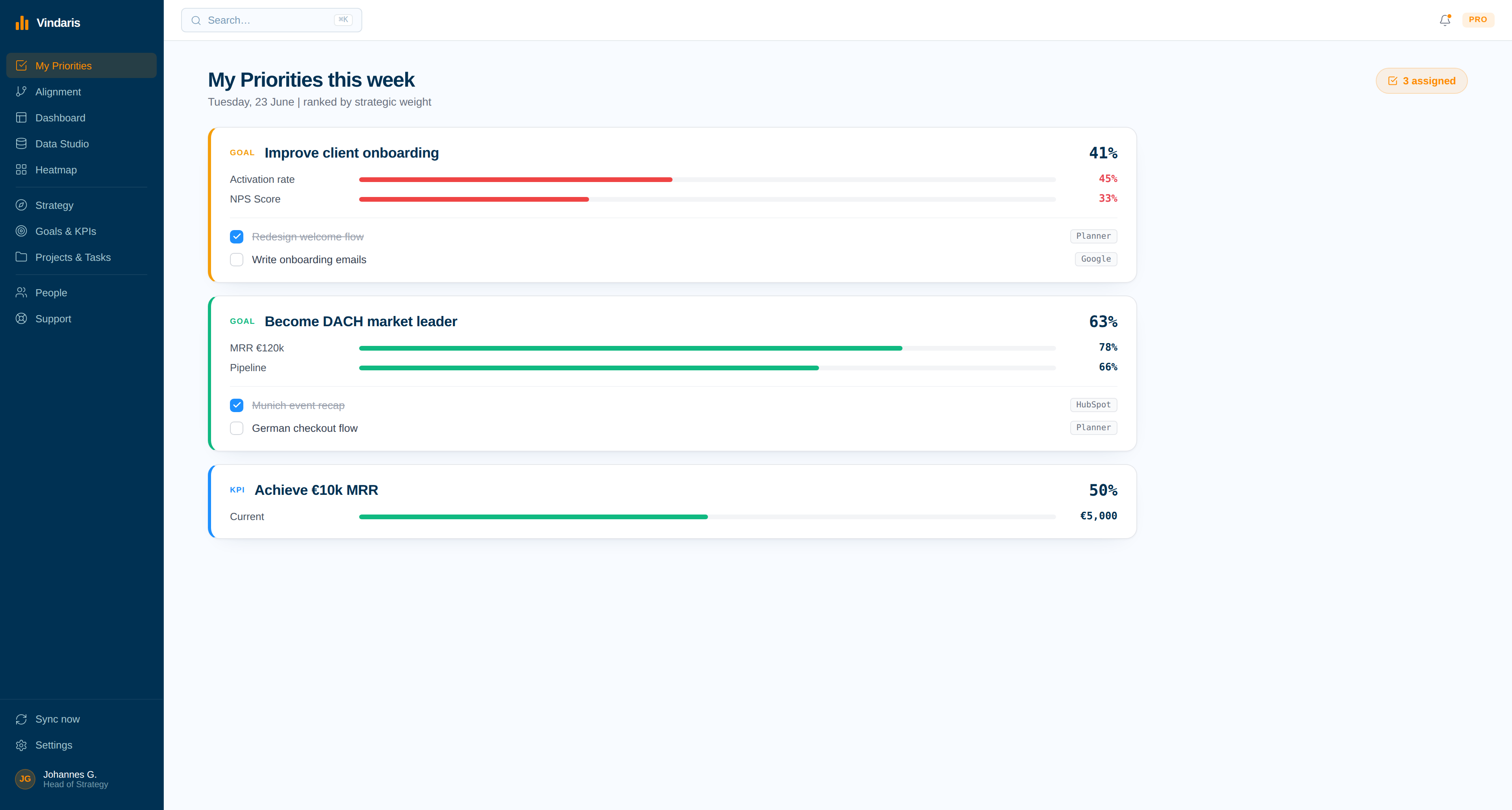
Tasks from Google arrive with everything else a person owns and get ranked by goal weight, which turns a flat list into a decision about what to do first.
Where individual work meets the strategy.
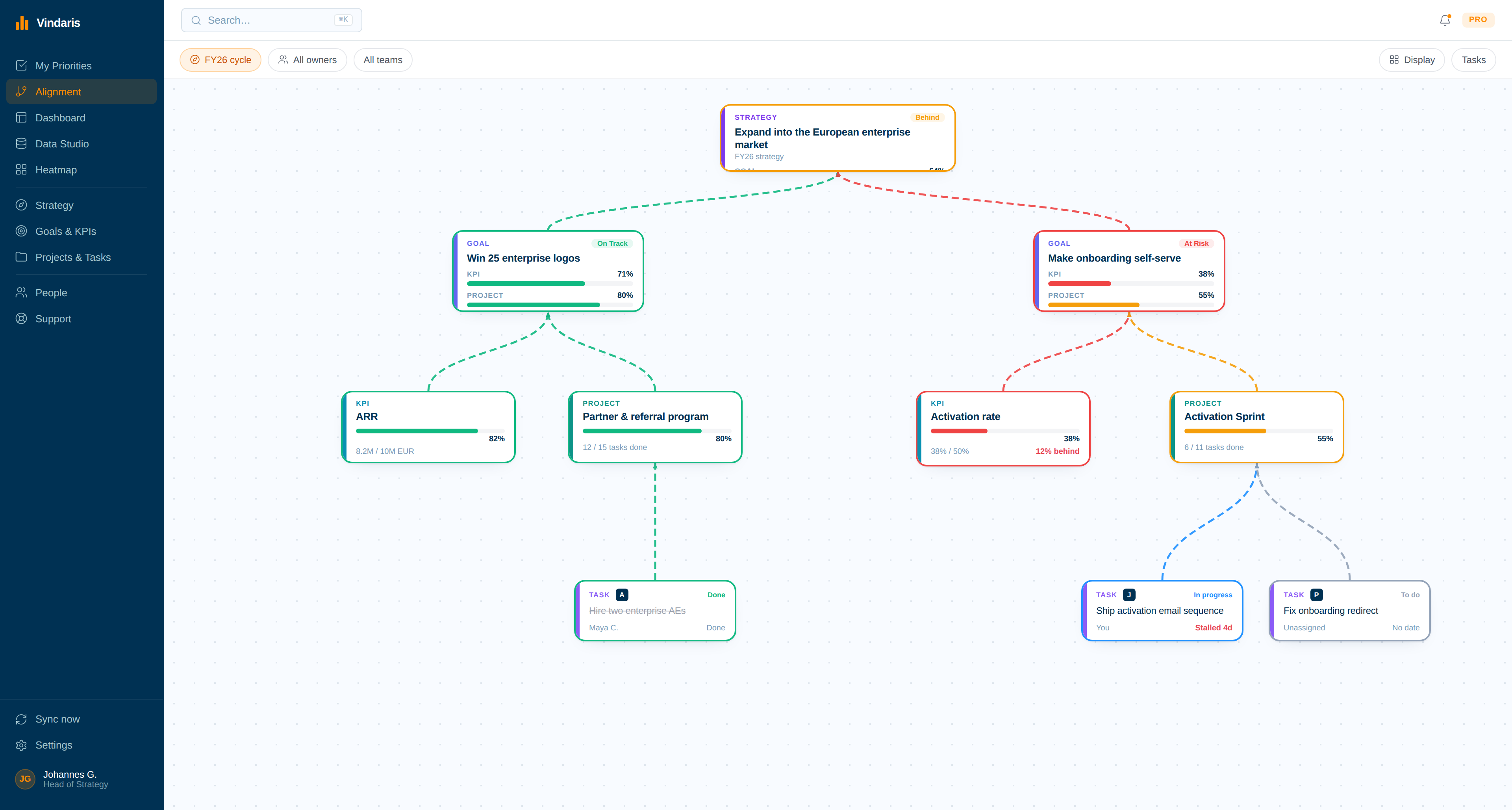
Follow a single task upward to the goal and the strategy it serves, or downward from an objective to see whether anyone has written the work down at all.
Commitments made in meetings die in the list they were written into.
The task gets captured, the meeting ends, and the item sits in a personal list that no plan ever reads. Three weeks later the objective it belonged to is behind, and reconstructing why means asking four people what they remember agreeing to.
Connecting Google Tasks closes that loop cheaply. The commitment stays where it was written, but it now belongs to a goal, contributes to that goal's progress when it is completed, and counts against it when it is not. The Work Graph reads the timing rather than the intention, so an objective with a list of untouched tasks is flagged well before the review.
Where to go next
Google Tasks and Vindaris, answered
Which Google Tasks list gets synced?
One list per connection, chosen by you. Most people connect their default list and leave personal lists out of Vindaris entirely.
Does this need a Google Workspace administrator?
No. The connection is user-level OAuth, so an individual can authorize it themselves unless your organization restricts third-party app access centrally.
Do completed tasks update the goal immediately?
Progress is derived from completions as they sync, so a goal reflects finished work without anyone entering a status. The Work Graph also uses completion timing to judge pace against the target date.
Can Google Tasks and another tool feed the same goal?
Yes. A goal can draw on Google Tasks, Jira, Planner, and any other connected source at once, with each item carrying its own source tag so you can see where the work is happening.
Make the quick list count toward the quarter.
Connect Google Tasks in a couple of minutes. Free forever for goal management, two integrations included.
Connect Google Tasks freeNo credit card | No migration | Nobody leaves Google Tasks
