 Salesforce
Your revenue KPI, read straight out of Salesforce every day.
Write the SOQL aggregate that defines the number, bind it to a KPI, and Vindaris records the value daily. The metric on your strategy board becomes the metric in the CRM, with a history the Work Graph can measure pace against.
Free forever | Two integrations included | Your team keeps working in Salesforce
One query, defined once, answered every day.
Every company already has an agreed definition of its revenue number, usually living in a report someone rebuilt. Expressing it as a SOQL aggregate makes it reproducible, and Vindaris then keeps answering it without anyone opening Salesforce.
Sums, counts, and averages over any object your user can query. If Salesforce can answer it, a KPI can be bound to it.
The query result is read as one number and recorded as a KPI update, which keeps the metric unambiguous and comparable over time.
Values are recorded on a schedule, so the KPI accumulates the trend line the Work Graph needs to judge whether the target is still reachable.
Because you write the query, the KPI matches how your organization actually counts revenue, including the exclusions everyone argues about.
Salesforce does not return a token lifetime, so Vindaris refreshes on an invalid session rather than guessing at expiry. Org session policies do not break the feed.
The integration is pinned to a supported REST API version, so the connection does not need re-certifying every release cycle.
Authorize, write the query, bind it to a KPI.
This is a read-only feed by design. Vindaris does not write records into Salesforce.
Connect through OAuth with a user who can query the objects the KPI needs. Credentials are stored encrypted per organization.
Express the metric as a SOQL aggregate. Vindaris runs it once, shows the value it read, and you confirm the number is right.
Attach the query to the KPI on your strategy board. From that point the value updates itself daily.
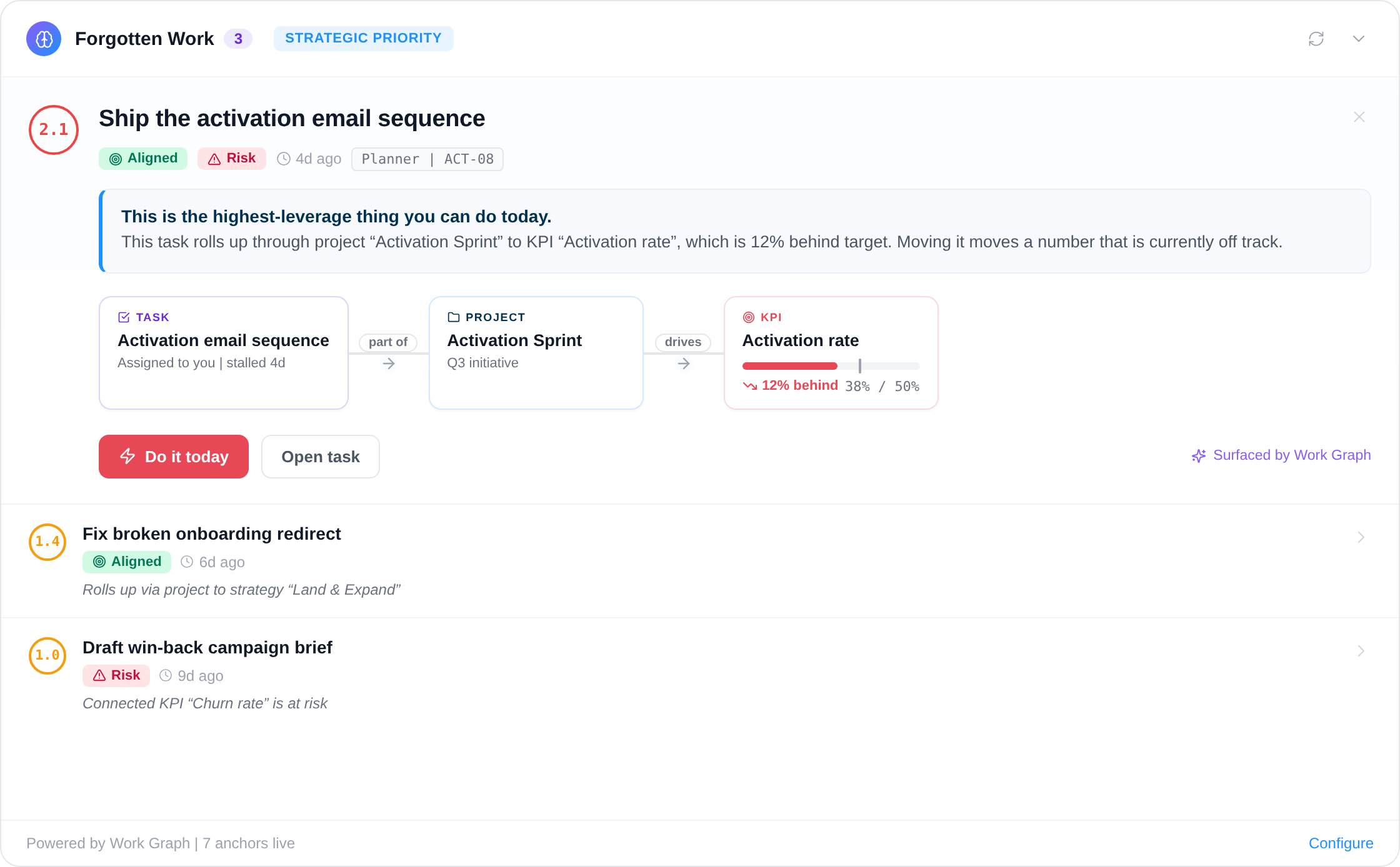
Map the projects and tasks meant to move that number, from any connected tool, so pace analysis has both the metric and the effort.
A board number that came from the system of record.
The KPI on the dashboard is the SOQL result, not a figure retyped from an export, which ends the argument about which version of revenue is current.
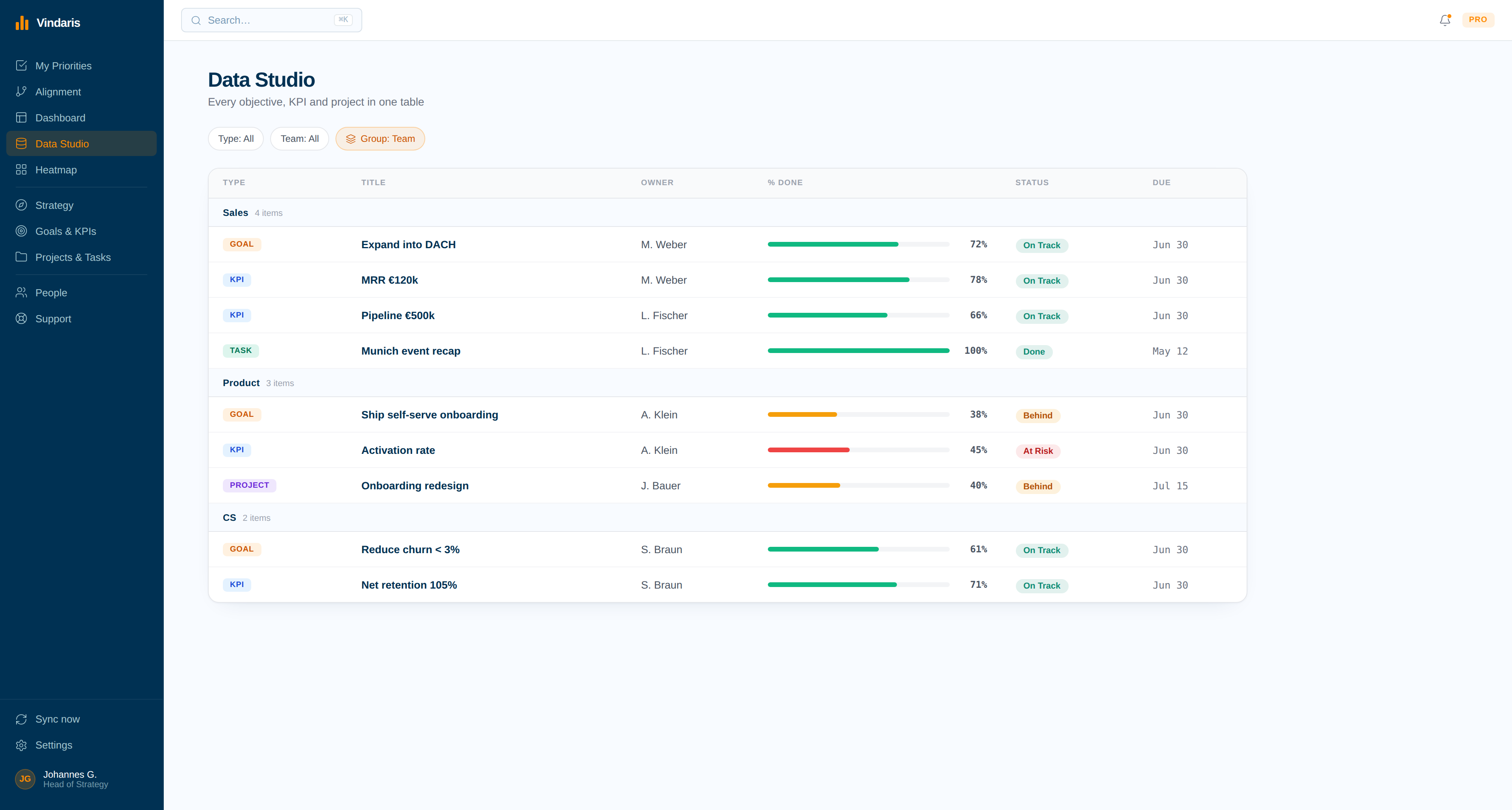
Effort measured against the number it should move.
With the metric live and the work mapped, Vindaris can tell you that the pipeline goal has plenty of activity and no movement, which is a very different problem from having neither.
The number is in the CRM. The goal is somewhere else. Somebody types the gap.
Almost every company with Salesforce also has a monthly ritual where a person exports a report, adjusts it, and pastes the result into a strategy tool or a slide. The number is stale the moment it is pasted, and the person doing it is usually the one whose time is worth the most.
Binding the KPI to a query removes both problems. The value is current, it has a documented definition anyone can inspect, and it carries enough history for the Work Graph to say whether the target is still reachable at the current run rate. Nobody spends a morning rebuilding a number that a query already answers.
Where to go next
Salesforce and Vindaris, answered
Does Vindaris sync Salesforce tasks?
No. The Salesforce integration feeds KPI values from SOQL aggregates and is read-only by design. For task-level work, connect the tool where your teams actually execute, such as Jira, Asana, or Planner.
Do I need to write SOQL myself?
Yes, and that is deliberate. Writing the aggregate is how the KPI ends up matching your organization's real definition of the number, including the exclusions that a generic connector would get wrong.
How often does the value refresh?
A scheduled daily job runs the query and records the result, so the KPI accumulates a trend rather than showing a single current figure with no history behind it.
Will an org session timeout break the connection?
No. Salesforce does not return a token lifetime, so Vindaris refreshes when it sees an invalid session rather than relying on a guessed expiry. Session policies set by your admin do not interrupt the feed.
Stop retyping the revenue number into your strategy board.
Connect Salesforce in a couple of minutes. Free forever for goal management, two integrations included.
Connect Salesforce freeNo credit card | No migration | Nobody leaves Salesforce
