A dashboard to show a manager progress on an initiative
Assemble a shareable progress view for one initiative so updates are a link, not a slide deck.
Good fit if your manager wants to see how a specific initiative is tracking and you want it to update itself.
The point of this dashboard is to retire the weekly status slide. Instead of rebuilding a deck, you build one live view scoped to the initiative and share the link: it is always current.
Build it
- In Data Studio, create a view scoped to the initiative's goal and project.Filter Goals to the specific goal, and Projects/Tasks to the project that delivers it.
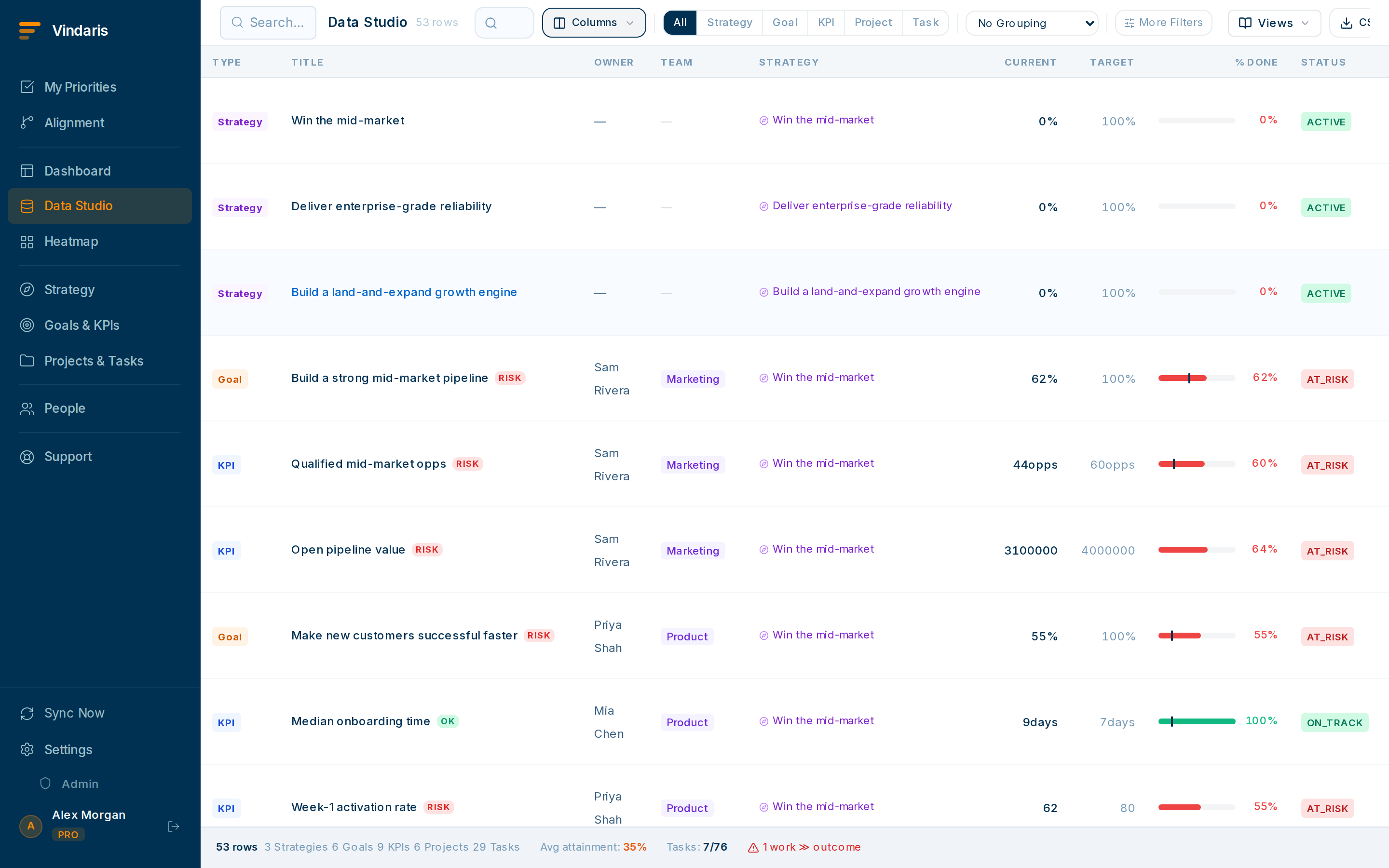
One initiative: its KRs, its progress, its open work. - Show the columns a manager cares about: key result progress, percent complete, owner, target date and status.Hide operational noise: they want trajectory, not every subtask.
- Add the goal's check-in history if available, so the narrative travels with the numbers.A number plus a one-line "why" is far more reassuring than a number alone.
- Save the view and share it with your manager.Use the view's share option to grant access. They open a link and see the current state: no export, no stale PDF.
An exported snapshot is wrong the moment a task moves. A shared view is governed by the same access rules as the rest of your data, so your manager sees exactly what they're allowed to and it's never out of date. Less prep for you, more trust for them.
If a stakeholder lives outside Vindaris, any Data Studio view exports to CSV from the download icon. Use it for the rare consumer who genuinely can't open a link.
When teams reach for this
A progress view is a saved Data Studio view scoped to one initiative: its goal, the project under it, and the tasks and KPIs that show movement. Because it draws on the live map, the link you share keeps updating after you send it.
Who it helps
Vindaris fits the project or team lead reporting up, and the manager or exec who wants initiative status without asking for it. It suits scale-ups and mid-market companies, roughly 30 to 500 people, where managers oversee several initiatives at once and cannot chase each for updates.
Why it helps
At that size status by slide deck means the manager sees a snapshot that is stale the moment it is made, and the lead loses an afternoon building it. A shared live view of one initiative makes the update a link that is always current, so the lead stops reporting and the manager stops asking.
In practice
- Scope a view to the one initiative. Filter a view to the goal and project behind the initiative, with the columns a manager cares about, so it shows progress without the rest of the workspace. The view answers one question cleanly.ExampleA PM builds a view for the 'Billing revamp' initiative showing its goal, milestone tasks and the KPI it moves, and nothing else.
- Share a link, not a slide. Share the live view with your manager so they open current status whenever they want, which turns the weekly status update into a standing link. The number they see is the number in the system.ExampleA team lead sends the view link once, and the VP checks it before the monthly review instead of requesting a deck.
- Export a CSV when someone needs one. When a stakeholder wants the numbers in a spreadsheet, the view exports to CSV, so the live view and the one-off export come from the same data. You are not maintaining two versions.ExampleA finance partner asks for the figures, and the lead exports the same view to CSV rather than rebuilding the numbers by hand.
Vindaris maps your strategy, goals and KPIs down to every project and task, and the Work Graph flags execution risk wherever effort has drifted from the goal, with task-level context down to the Slack thread.
Put this into practice
Vindaris keeps strategy, goals, projects and tasks in one place, and the Work Graph flags execution risk before it costs you. Start free, no credit card.
Sign Up for Free