Reading the dashboard
Decode KPI cards, goal progress, the heatmap and the AI briefing so the dashboard actually informs decisions.
Good fit if you want to understand what every chart is telling you before you build your own.
The Dashboard is a snapshot of organizational health for the current period. Knowing what each component means turns it from decoration into a decision tool.
From top to bottom, here's what you're looking at:
- KPI cards (top row).Your headline metrics: goal completion rate, tasks completed this week, team velocity. Together they answer one question: are we moving?
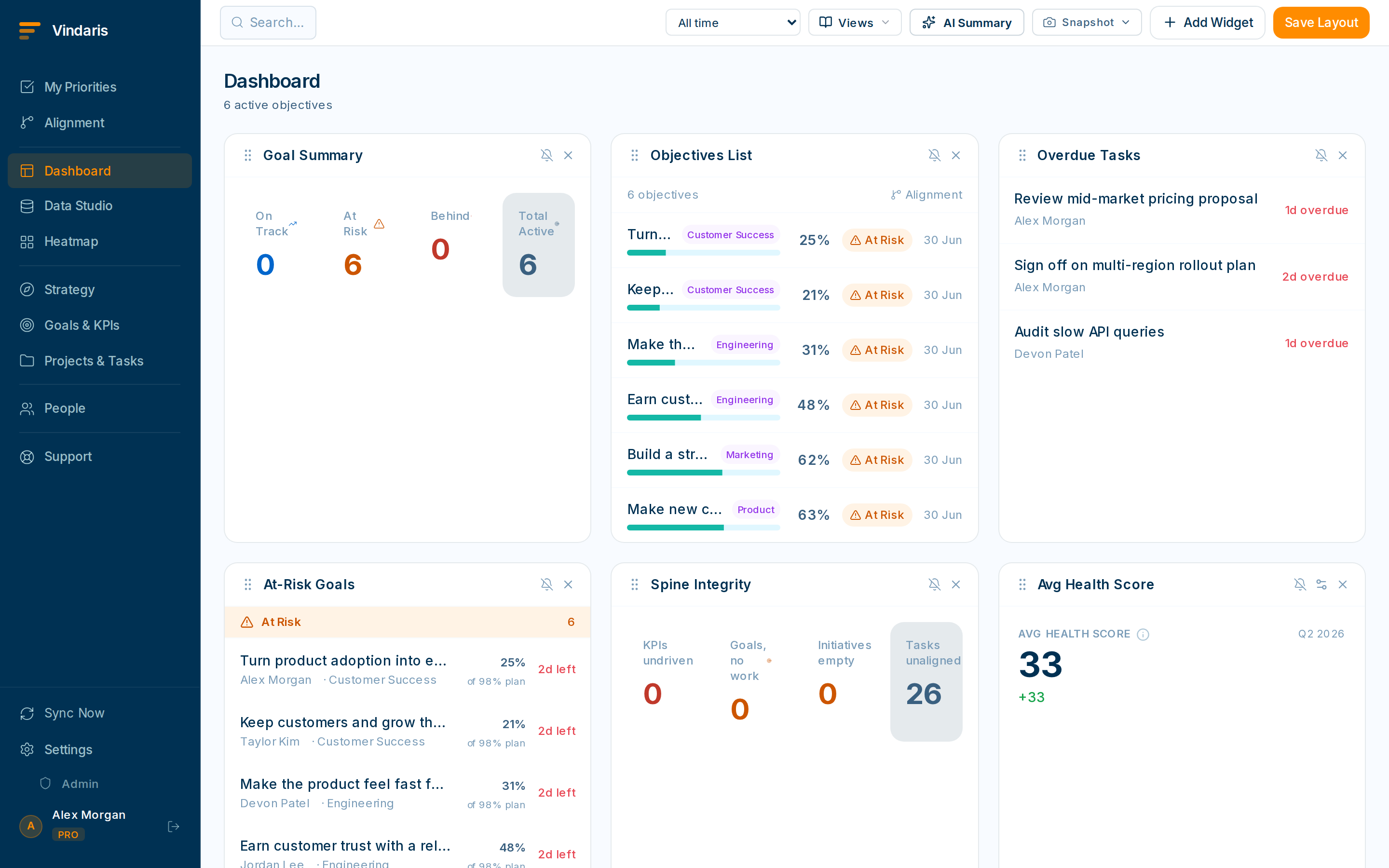
KPI cards, goal progress, heatmap, and the AI briefing. - Goal progress chart.Every active goal by completion percentage, grouped by category or owner. Spot the laggards instantly.
- Activity heatmap.Task activity across days and weeks. Darker squares mean more completions; a pale patch before a deadline is an early blocker warning.
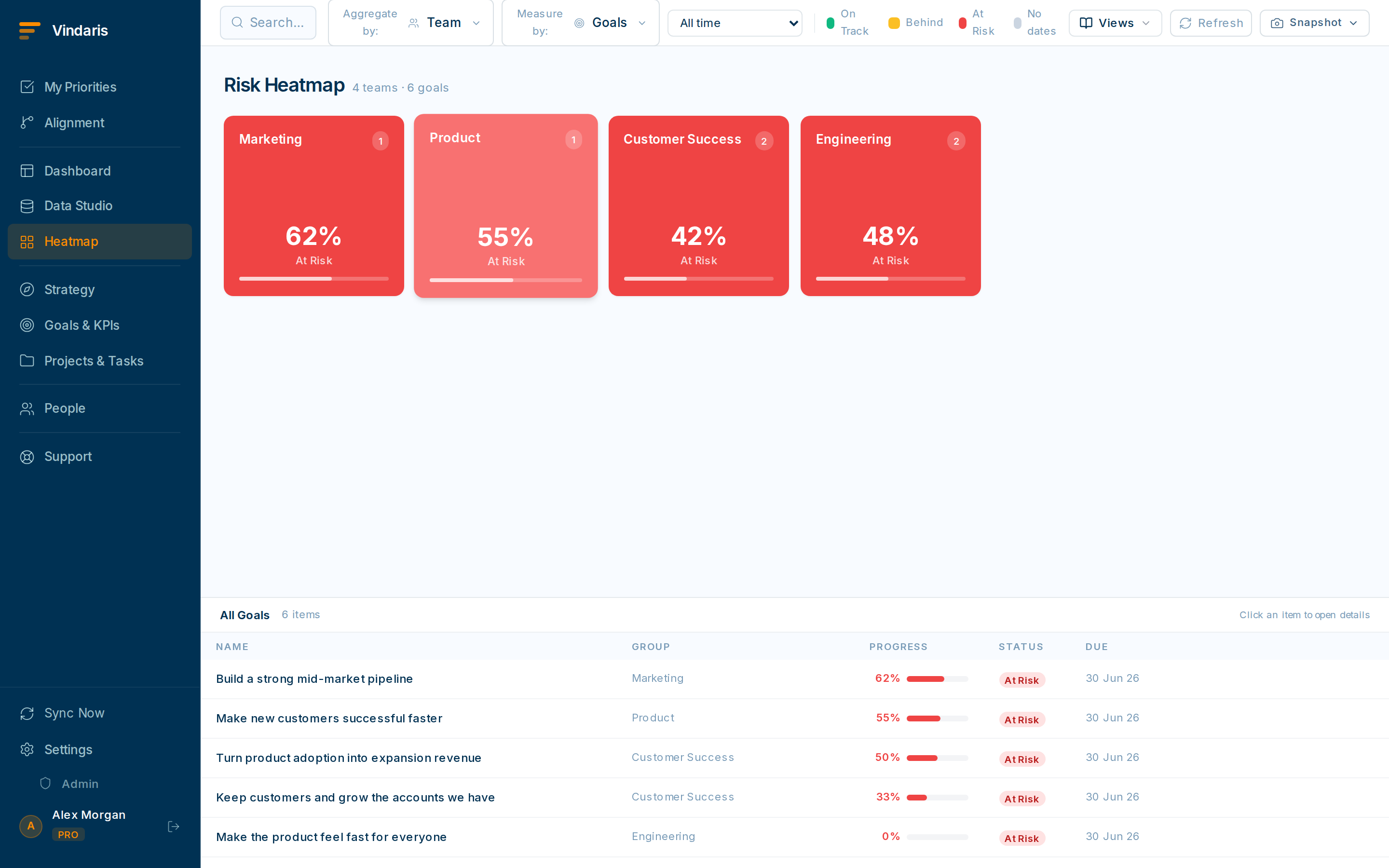
The Heatmap makes quiet weeks and busy sprints instantly visible. - AI briefing (if enabled on your plan).A short narrative of the day's risk and priorities, generated from your goals and tasks. Read it first for context, then dig into the charts.
Green, yellow and red let your eye do the triage. Health is computed from pace (how current values are tracking against the timeframe), not from someone's mood. A red goal is one the math says won't make it without intervention, which is precisely what you want to see early.
Use the period selector (top right) to switch between weekly, monthly and quarterly views. Once you know how to read the built-in dashboard, the next four articles show how to build purpose-specific ones.
When teams reach for this
The dashboard stacks the parts of the map top to bottom: KPI cards for the hard numbers, goal progress for the outcomes, the heatmap for where things are slipping, and an AI briefing that puts the state into words. Health is color-coded, so a red tile is a prompt to click in.
Who it helps
Vindaris fits anyone who opens a dashboard to make a call: the exec scanning outcomes, the manager checking a team, and the IC tracking their own goals. It suits scale-ups and mid-market companies, roughly 30 to 500 people, where the dashboard is where several teams' progress comes together.
Why it helps
At that size a dashboard only helps if people read it the same way, or it turns into decoration no one trusts. Knowing what the KPI cards, goal progress, the heatmap and the AI briefing each show means the dashboard informs a decision instead of prompting a follow-up question.
In practice
- Read each part for what it actually shows. KPI cards carry the measured numbers, goal progress shows how far outcomes have moved, and the heatmap marks where risk is clustering, so you know which part answers your question. Reading them right means fewer wrong conclusions from one glance.ExampleA manager checks the KPI card for the real revenue number, then the heatmap to see which team is dragging it, in two moves instead of a meeting.
- Use the color to triage. Health is color-coded from on-track to off-track, so the red and amber tiles tell you where to look without reading every row. The color does the first pass of triage for you.ExampleAn exec opens the dashboard, skims past the green, and clicks the one red KPI, which is the whole of what needed attention that morning.
- Let the AI briefing give you the words. The AI briefing turns the current numbers into a short written summary scoped to what you are looking at, so you get the story behind the charts without assembling it. It draws only on the live data, so the words match the tiles.ExampleBefore a stand-up a team lead skims the briefing, which names the two goals that moved and the one at risk, and uses it as the opening line.
Vindaris maps your strategy, goals and KPIs down to every project and task, and the Work Graph flags execution risk wherever effort has drifted from the goal, with task-level context down to the Slack thread.
Put this into practice
Vindaris keeps strategy, goals, projects and tasks in one place, and the Work Graph flags execution risk before it costs you. Start free, no credit card.
Sign Up for Free