Watching strategy vs. BAU allocation
Read the Strategy-vs-BAU split on the dashboard, see the trend, and break it down by team and org level as an admin.
Good fit if you suspect the team is drowning in run-the-business work and want to see how much effort reaches the strategy.
Every open task is one of: Strategic (it advances a goal), BAU (it keeps the lights on), Unclassified (not yet triaged) or Ignored. The allocation view shows that mix as a single bar, so you can see whether strategy is actually getting the team's hours, or whether BAU has quietly eaten them.
- Open the Dashboard and find the "Strategy vs. BAU" panel.The segmented bar shows the share of open work that is Strategic, BAU and Needs-review, each with its percentage.
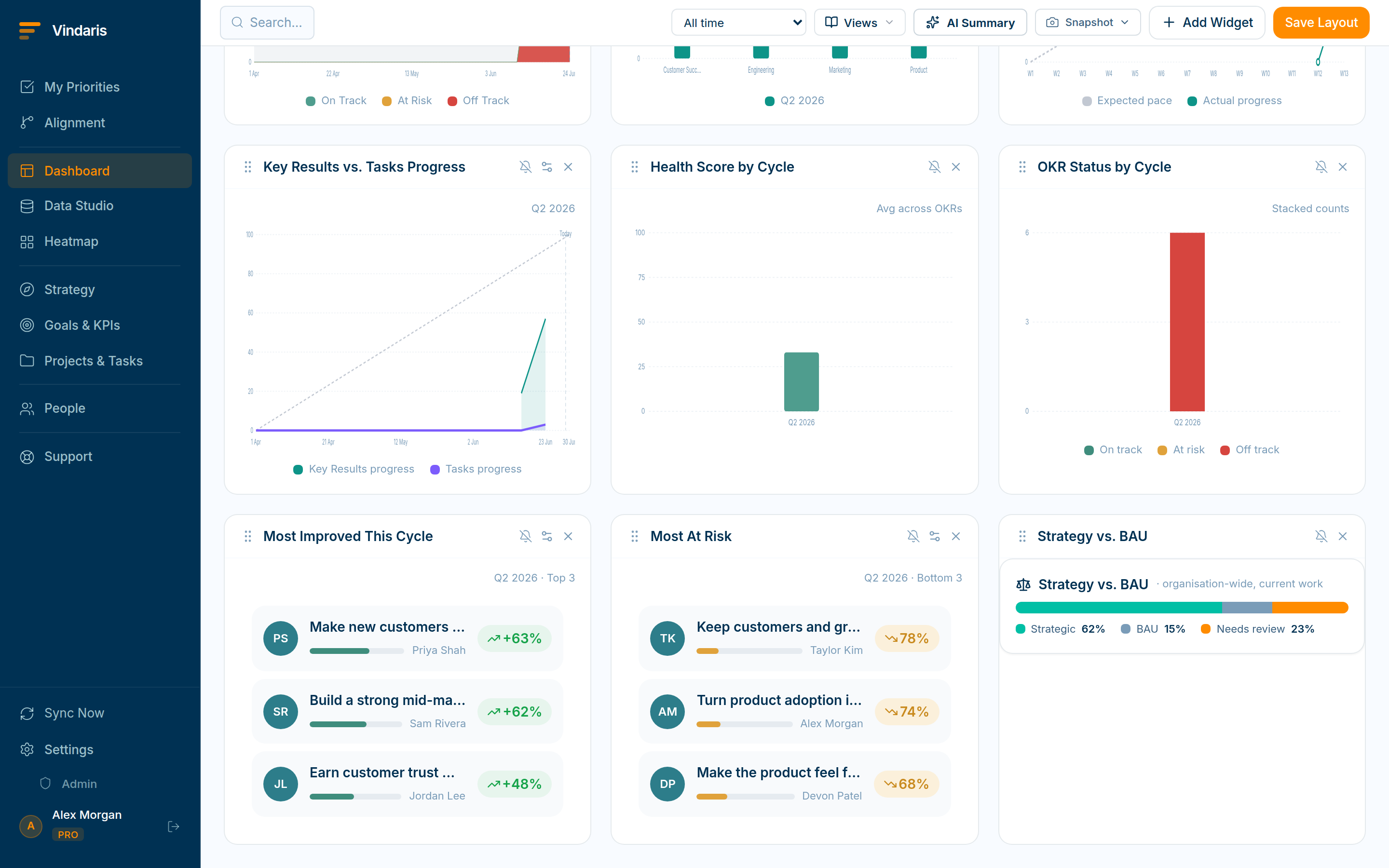
The allocation split, with a month-over-month trend. - Read the trend indicator next to the bar.It compares this month to last (e.g. "BAU up 3 pts" in red, or "no change" in gray) so creep is visible before it is a crisis.
- As an admin, open Admin → Strategy vs BAU for the full breakdown.It splits the mix org-wide, by team and by org-chart level, so you can find exactly where run-the-business work is concentrated.
Strategy does not fail in big dramatic decisions. It fails one urgent BAU ticket at a time, until there are no hours left for the work that actually moves the needle. Putting the split on a chart turns an invisible drift into a number you can set a target against and defend in a planning meeting: "we said 65% strategic; we are at 48%."
In Admin → Work Graph an admin can set a target strategy ratio and a BAU-creep threshold. When BAU rises past the threshold, the owners get a "BAU crowding out strategy" notification, so you find out from an alert, not from a missed quarter.
When teams reach for this
The Strategy-vs-BAU view shows what share of the team's effort goes to strategic work versus business-as-usual, based on how tasks are classified. It plots the trend over time and, for admins, breaks the split down by team and org level.
Who it helps
Vindaris fits the COO and Chief of Staff who own how effort is spent, the executive worried the strategy is starving, and the admin who sets targets for the split. It suits scale-ups and mid-market companies, roughly 30 to 500 people and multi-team, where day-to-day operations can quietly crowd out strategic work.
Why it helps
As a company scales, run-the-business work expands to fill the week and strategic initiatives get what is left, often without anyone deciding it. The Strategy-vs-BAU view measures the actual split and its trend, so a drift toward keeping the lights on shows up as a number you can act on rather than a nagging feeling.
In practice
- See how much effort reaches the strategy. The view measures the split between strategic and run-the-business work, so the suspicion that the strategy is starving becomes a percentage you can point to. You find out whether effort matches the priorities leadership set, not just whether people are busy.ExampleThe split shows 80 percent of a team's effort going to BAU, so the COO reprioritizes two initiatives before the quarter's strategic goal stalls.
- Watch the trend, not just today's number. The view plots the split over time, so a slow slide toward more BAU shows as a trend line while there is still time to correct it. A single snapshot can mislead, because the trend shows where allocation is heading.ExampleStrategic effort drifts from 40 to 25 percent over six weeks, and the trend line prompts a staffing change before the strategy stalls out.
- Set a target and get alerted on creep. An admin sets a target for the strategic share and a risk alert fires when BAU creeps past it, so you are told when the balance tips instead of checking the chart. The allocation defends itself between reviews.ExampleWith a 35 percent strategic target set, the team gets a Slack alert the week BAU pushes the strategic share below it, and rebalances the same day.
Vindaris maps your strategy, goals and KPIs down to every project and task, and the Work Graph flags execution risk wherever effort has drifted from the goal, with task-level context down to the Slack thread.
Put this into practice
Vindaris keeps strategy, goals, projects and tasks in one place, and the Work Graph flags execution risk before it costs you. Start free, no credit card.
Sign Up for Free